A POS upgrade has no single fixed price. The cost to upgrade a small business POS system depends on the software plan, transaction volume, number of users, hardware needs, and add-ons. A low monthly subscription may not reflect the full cost of running the system.
That makes comparing options more involved than lining up monthly fees. Account for how pricing may change as sales and staff grow, as well as the equipment and integrations your setup requires. Compare what you’ll pay over time, not just the amount on the first quote.
This guide explains how POS software pricing works and how transaction volume and user counts can affect costs. It also provides a framework for comparing three-year ownership costs across five common approaches, so you can identify the expenses that matter and make a more informed upgrade decision.
Key Takeaways
- Separate software subscriptions, payment processing, hardware and add-ons to see what drives your POS costs.
- Compare how transaction volume and user counts affect pricing as your business changes.
- Build a three-year cost comparison that accounts for setup, migration, training and ongoing expenses.
- Factor hardware lifecycle into your decision, and remember that equipment warranties come from the manufacturer.
- Use a consistent set of criteria to compare POS options and identify the setup that fits your operations.
How much does POS software cost?
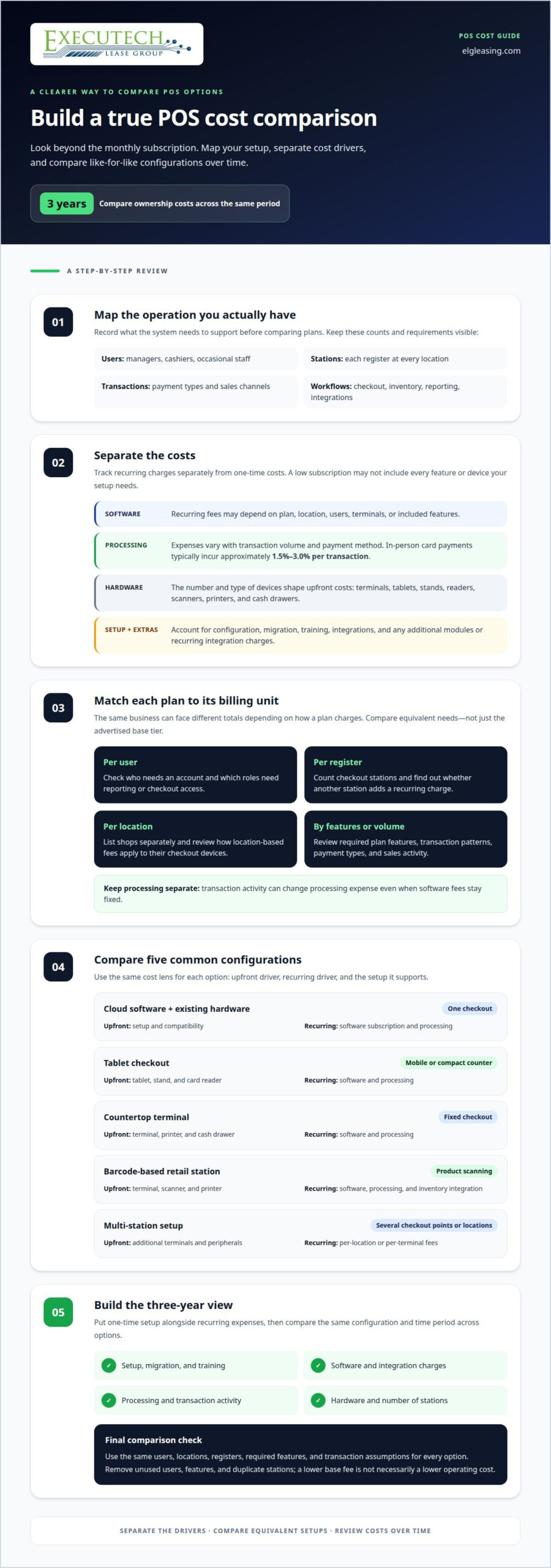
POS costs can include software, payment processing, hardware, and setup. Separate each line item to assess whether a seemingly low monthly fee fits your checkout and inventory needs.
Upfront Fees and Subscriptions
Cloud POS software typically uses a recurring subscription, while hardware may involve a separate upfront cost. Compare what each plan includes, such as inventory tools, user access, integrations, and checkout stations. A lower subscription may still require extra modules or equipment. Record recurring fees separately from one-time purchases so your budget reflects the system you actually need.
Implementation and Setup Costs
Setup involves more than installing software. It may include configuring products, inventory, permissions, integrations, and checkout workflows, then preparing each station for staff. Larger businesses may face more coordination when connecting locations, data, and existing systems, making implementation scope an important factor beyond the subscription alone.
Software, Processing, and Hardware Costs
Keep three cost categories distinct. Software fees recur by plan or location; processing fees vary with transaction volume and payment method; hardware costs depend on the number and type of devices. In-person card payments typically incur processing fees of approximately 1.5%-3.0% per transaction. A tablet-based checkout may need a stand, card reader and receipt printer, while a countertop register can add a terminal and cash drawer. Integrations can also add recurring charges.
Use this comparison to identify the main cost driver before choosing a configuration:
| POS option | Upfront cost driver | Recurring cost driver | Typical configuration |
|---|---|---|---|
| Cloud software with existing hardware | Setup and compatibility | Software subscription and processing | One checkout using devices already on hand |
| Tablet checkout | Tablet, stand and card reader | Software and processing | Mobile or compact counter service |
| Countertop terminal | Terminal, printer and cash drawer | Software and processing | Fixed checkout with printed receipts |
| Barcode-based retail station | Terminal, scanner and printer | Software, processing and inventory integration | Product scanning at checkout |
| Multi-station setup | Additional terminals and peripherals | Per-location or per-terminal fees | Several checkout points or locations |
Hardware choices affect the initial outlay, while subscriptions and processing shape ongoing expenses. For example, a scanner can support barcode checkout, while another terminal increases the number of stations and may affect recurring fees. List the devices, software features, and integrations your operations require, then compare like-for-like configurations. Choose a setup that covers essential checkout and inventory tasks without paying for unused stations or functions.
Transaction-volume and user-based pricing
Estimate POS pricing by matching transaction volume, staff access, locations, and registers to each plan’s billing method. To manage costs, remove unused users and features, avoid duplicate stations, and compare processing charges separately from software fees.
Transaction volume affects processing expenses, while software pricing may depend on terminals, locations, features, or users. A busy retailer and a lower-volume shop can therefore have different totals, even on the same software tier. Use sales records to understand payment types and transaction patterns, then compare how each pricing model handles that activity.
User-based plans scale with staff access, while terminal-based plans scale with checkout stations. Review who needs an account, the permissions each role requires, and whether occasional staff need full access. For example, managers may need reporting functions while cashiers need checkout access. A plan that charges per user can cost differently from one priced by register.
Location-based billing may suit businesses with several checkout devices in each shop. Per-register billing ties the subscription more closely to station count, which may be easier to model for one location with multiple registers. Before comparing plans, list locations and stations separately. Find out whether adding a checkout point changes the software tier or creates another recurring charge.
Retail and restaurant POS pricing can reflect different operational needs. Retailers may prioritize inventory controls, barcode workflows, and product reporting. Restaurants may need tools for menus, orders, and service workflows. These requirements can affect the plan tier, while custom integrations, additional user roles, and extra registers can also shape the total.
Use this review before comparing plans:
- Count users: Separate managers, cashiers and occasional staff by access needs.
- Map checkout stations: Record each register at every location.
- Review volume: Group transactions by payment type and sales channel.
- Trim features: Keep functions connected to actual inventory, checkout or reporting work.
Calculate recurring charges using each plan’s billing unit. Keep processing charges separate, since transaction activity can change that expense even when software fees stay fixed. Compare equivalent configurations with the same number of users, locations, registers, and required functions. This helps avoid mistaking a lower base tier for a lower operating cost.
Contract flexibility, cancellation terms and volume-based pricing also belong in the review. Place those terms beside user limits, register charges and integration costs. If equipment acquisition is part of your upgrade plan, you can start an equipment application as one financing step.
How Much Does a POS System Cost?
There is no single average U.S. price for a small-business POS hardware upgrade. The cost to upgrade a small business POS system depends on the equipment you keep, the devices you replace, and the number of checkout stations in the new configuration.
Hardware Lifecycles and Warranties
Hardware age matters because older devices may not fit new software or payment-processing requirements. POS tablets may need replacement as batteries degrade, but one aging tablet does not automatically make every checkout component obsolete. Assess terminals, card readers, printers, and cash drawers separately. A device-by-device plan is more useful than treating the entire setup as one replacement.
Equipment warranties come from the manufacturer. Review each device’s terms and distinguish covered defects from ordinary wear or damage. A mobile reader used occasionally has a different operational role from the main register. Prioritize replacement according to each device’s condition, compatibility, and importance to daily checkout.
Financing and Installments
Paying upfront concentrates equipment costs at purchase. Financing or leasing divides equipment costs into scheduled payments, with terms set by the agreement. Compare the payment schedule, overall commitment, and end-of-term terms against your equipment plan. These arrangements address how equipment is acquired, not whether a device suits the POS software.
For example, a shop replacing its main register and adding a mobile terminal can compare an upfront purchase with payment arrangements for the same equipment. List each device and any installation or training included in the arrangement. This supports a like-for-like comparison without assuming every option covers the same items.
Upgrading Existing Hardware
Start by listing current devices and noting their condition, compatibility, and purpose. Then compare them with the new system’s requirements. A working receipt printer may remain useful even if the touchscreen needs replacing. This identifies the hardware gap without treating every existing component as an automatic replacement.
The upgrade scope also depends on how many devices need changing. A single-register setup differs from several stations with mobile readers and peripherals. Identify each required device, then separate equipment, setup, and staff training in your estimate. This clarifies which elements are necessary for the planned checkout workflow and which are optional additions.
Use this replacement sequence:
- Keep: Compatible hardware that continues to support checkout.
- Replace: Devices with degraded batteries, failing components or compatibility gaps.
- Budget: Equipment, setup and staff training as separate items.
A device-by-device review gives you a practical estimate based on your actual configuration, rather than an unrelated average.
Three-year total cost of ownership
Compare each POS option over the same three-year period. Include equipment, setup, recurring charges, processing, integrations, and transition work. Using a consistent timeframe can show whether a bundled plan costs less overall or simply places charges in different categories.
Use one calculation for every option: upfront equipment and setup, plus 36 months of recurring charges, plus variable processing and transition expenses. Subtract only expenses you genuinely avoid, such as replacing a device that remains compatible. Record whether each provider bills by location, terminal, user or feature, so the comparison reflects equivalent configurations.
Subscription packaging can make headline fees difficult to compare. One provider may include tools in a software tier, while another charges separately for integrations or add-ons. List every function your business needs and note whether it is included, optional, or billed separately. Keep processing fees distinct from software charges because transaction volume and payment mix affect that part of the total.
Include transition work as its own category. These expenses may arise when product records, customer data, or checkout workflows move to a new platform. Separate each task to identify what drives the transition budget.
Contract terms also belong in the comparison. Record applicable contract costs beside recurring charges, rather than treating them as ordinary monthly expenses. Review the full term and billing basis so one-time charges do not disappear inside a general subscription estimate.
Build one column for each POS option and include these categories:
- Recurring: software subscriptions, add-ons, integrations and location charges.
- Variable: processing fees estimated from your transaction mix.
- Transition: migration, downtime and staff training.
- Equipment and contract: devices, replacements and applicable contract costs.
Use your transaction records to estimate processing costs, and count only the terminals your operations require. Compare the same users, locations, devices, and software functions across each provider. This prevents a basic plan from being compared with a more fully configured setup.
Finally, test the total against a realistic operating scenario. Consider how costs may change if transaction volume rises, you add a location, or staff need more user access. This stress test shows which charges scale with activity and which remain fixed, helping you choose a POS arrangement that fits planned operations.
Choosing a POS system
Choose a POS system by matching its functions to daily operations, then comparing the total cost. A feature-rich platform adds value only when your team uses its reporting, inventory management, or loyalty tools.
Start with the work your current setup needs to handle. List checkout steps, inventory tasks, sales reporting needs, and customer loyalty activities. For example, a retailer with frequent stock changes may prioritize inventory management, while a service business may value appointment and customer records. Classify each requirement as essential, useful, or unnecessary before evaluating plans.
Next, test how the platform handles routine work. Ask employees to process a sale, return an item and locate a product. A user-friendly POS system should let most new employees learn its layout in under an hour. Observe where they pause. Extra training and slower checkout can add operational friction even when a subscription appears affordable.
Compare these criteria for each candidate:
- Checkout fit: Can staff complete typical sales and returns without extra steps?
- Inventory: Does inventory management support how you track products and stock changes?
- Reporting: Can managers access the sales details needed for routine decisions?
- Loyalty: Does the system support the customer rewards process your business uses?
- Integration: Does it connect with tools already central to your operations?
- Scalability: Can the platform support added users, registers or locations?
Security and continuity deserve the same scrutiny as features. Compare the system’s stated approach to PCI compliance, encryption, and tokenization. Test offline mode for card-present transactions, then determine how staff can continue checkout if internet access drops. A planned test can reveal workflow gaps before launch.
Migration also affects the decision. Map how items, customers, and vendors will move from the existing POS. Export records, import spreadsheets into the new system, and run test sales before go-live. This sequence can surface data or checkout issues before the old system is retired.
Finally, compare the three-year total cost using the same requirements for every platform. Include software, processing, hardware, integrations, training and transition costs. A unified commerce platform can improve total cost of ownership by 22% compared with fragmented application stacks. That comparison matters most when separate tools duplicate functions or require extra integrations.
Use this decision guide: choose the simplest platform that meets essential checkout, reporting, and inventory needs; choose a broader system when its added functions replace separate tools; prioritize a mobile-ready setup when sales happen away from a fixed register. Rank your needs first, then compare cost and workflow fit.
Executech Lease Group (ELG Leasing): 12-60 Month Credit Card and POS Equipment Leases
Executech Lease Group (ELG Leasing) helps merchants acquire POS and credit card terminal equipment through 12-60 month leases. If your cost comparison points to replacing equipment, leasing can spread equipment costs across scheduled payments rather than concentrating the full purchase upfront.
Choose a structure that fits your equipment plan. Lease-to-own programs provide an ownership path, while FMV lease options have different end-of-term terms. ELG also leases POS equipment, including Clover devices. These options address equipment acquisition, not payment processing or POS software subscriptions.
For a useful comparison, list the terminals and POS equipment you need, then evaluate the lease structure alongside your three-year ownership costs. Explore ELG’s equipment lease options to discuss POS equipment leasing for your business.
Make Your POS Upgrade Decision With Confidence
Turn your comparison into a short decision brief before choosing a system. Record the operational problem to solve, the capabilities that matter most, and the trade-offs you are willing to accept. This gives your team a clear standard for assessing proposals instead of focusing on the most prominent feature or lowest headline fee.
The cost to upgrade a small business POS system is only part of the decision. Consider whether the proposed setup supports how your business expects to operate next, as well as its current checkout needs. A disciplined evaluation makes it easier to explain the choice, plan the transition, and align the equipment decision with your business priorities.
If equipment acquisition is part of your next step, discuss the available options with Executech Lease Group (ELG).
Set a clear target, make the decision deliberately, and move forward with a POS setup built around your business.
Frequently Asked Questions
How Can You Avoid Hidden Fees in POS Contracts?
List every recurring and transaction-based charge separately before comparing contracts. Check whether the quoted subscription includes user access, inventory features, integrations, and reporting, or bills for them separately. Review how processing is priced for in-person, online, and keyed payments. Also look for renewal language, cancellation terms, and charges tied to additional locations or registers. A written cost schedule makes omitted line items easier to spot.
How Much Do Add-Ons and Integrations Cost?
Add-on costs depend on the feature, integration, and billing model. An accounting connection, ecommerce link, or advanced inventory function may carry its own recurring charge or require a higher software tier. Map each tool your team uses, then identify which POS functions replace existing tools and which require extra integrations. This helps avoid paying twice for similar capabilities and gives you a clearer estimate for your configuration.
How Much Do Migration and Downtime Costs Add Together?
The total depends on how much data moves, how staff prepare, and how checkout is maintained during the switch. Separate migration labor from lost sales or temporary operating disruption, then check whether an implementation quote already includes data transfer. For example, moving product records and customer profiles may require different work from rebuilding custom reports. Keep overlapping tasks out of the total to avoid counting the same work twice.
How much do POS hardware upgrades cost for small businesses?
Hardware costs depend on which components need replacing. Build a device-by-device list first. Reusing compatible peripherals may reduce the amount of new equipment, while adding checkout stations increases the hardware requirement.
What are the monthly software and subscription costs for small business POS systems?
Monthly software costs vary with plan features and billing units, such as users, terminals, or locations. A free entry-level plan may cover basic checkout, while inventory management, reporting, or additional access can require a paid tier. Check whether the subscription includes each feature your team needs. Estimate your recurring total using the actual locations and registers, then account separately for processing charges and optional integrations.
How much does POS installation, setup, and data migration cost?
Installation and setup costs depend on the configuration required, while data migration costs depend on the records and workflows being moved. A straightforward single-register setup differs from coordinating several stations, inventory records, and integrations. Ask for labor, configuration, and migration as distinct line items in the project estimate. This shows what drives the total and helps prevent setup work from being counted again as migration.
What payment processing fees should small businesses expect when upgrading a POS?
Online or keyed-in card payments typically incur processing fees of approximately 2.9%-3.5% or more per transaction. Your upgrade comparison should separate those charges from software subscriptions and hardware. Review the expected mix of in-person, online, and keyed transactions, since the payment method affects the processing estimate. Then apply the relevant fee structure to transaction records rather than assuming the software plan determines processing costs.
What are the costs of upgrading POS systems for retail versus restaurants?
Retailers may prioritize product records, barcode workflows, and inventory controls. Restaurants may need tools for menu and order handling. Identify the functions your operation needs, then compare plans that support those workflows. Add the hardware and integrations required for each setup before judging total cost.

Article by
Robert Ensminger
Robert Ensminger is the founder and CEO of Executech Lease Group (ELG Leasing), which specializes in equipment leasing and financing solutions for the merchant-services, payments, POS, and FinTech industries. With more than 20 years of industry experience, Robert helps ISOs, payment processors, POS providers, and software companies build practical equipment leasing programs. He founded ELG in 2010. His work focuses on responsive service, transparent program structures, subscription and SaaS-monetization programs, and helping ELG’s partners close more business while creating sustainable revenue.