Growth can outpace the systems meant to support it. If your business is growing too fast for its current POS, the strain may extend beyond checkout: cash flow tightens, teams handle transactions differently across locations, and leaders lose a consistent view of daily operations. There is no single sales or location threshold. Your POS is under strain when it can no longer support the consistency and oversight your expanding business needs.
It is reasonable to focus on opening the next location or keeping up with demand. But growth also brings equipment costs, staffing pressure, and more complexity to daily operations. A POS that worked for one location may become harder to manage as your business expands.
This article explains how to spot the signs of a mismatch, why rapid expansion can affect cash flow and operational consistency, and what to consider when planning for new locations. It also explains where POS equipment leasing may fit, without treating new hardware as a fix for every growth challenge.
Key Takeaways
- Growth can outpace your systems and processes; watch for signs that existing tools no longer support daily operations across locations.
- Strong demand can still strain cash flow when expenses arrive before revenue does. Keep timing and working capital in view as you expand.
- Standard practices and staff training help maintain a consistent customer experience as your business adds locations.
- Protect oversight of established locations while opening new ones, so expansion doesn’t pull attention away from current operations.
- POS equipment leasing can help structure equipment costs as your business scales, but it won’t solve staffing, process, or cash-flow problems on its own.
1. Can companies grow too fast?
Yes. Growth can outpace a company’s systems, staffing, cash, and management capacity. If your business is growing too fast for its current POS, signs may include inconsistent sales records, manual workarounds, or difficulty comparing locations. The POS may be one constraint, but it rarely explains every operational problem.
Expansion can expose outdated processes quickly. A sales method that works at one location may produce inconsistent inventory counts at several. Separate spreadsheets and local workarounds also make reporting slower. In a multi-unit franchise study, existing outlets became less likely to follow organizational routines during expansion. Around 70% of multi-unit expansion agreements may stall or underperform, according to a franchise operations consultancy cited in the research.
Cash pressure can rise before growth produces reliable returns. Hiring, equipment purchases, and new operating expenses may arrive before revenue catches up. The 2025 Relay Cash Flow Compass report found that 88% of U.S. small businesses were struggling with cash flow. That figure makes cash planning essential, but it doesn’t prove that a POS issue caused a particular business’s shortfall. Map expected inflows against bills and expansion expenses before committing to another location.
Growth can also make an old plan irrelevant. If leaders spend most of their time meeting daily demand, the original plan may no longer reflect customer needs or team capacity. Review which locations, products, and processes are absorbing resources. Then revise priorities and assign responsibility for strategic decisions, rather than letting urgent tasks set the direction by default.
Which POS systems are best for growing small businesses in the United States? The right fit is a system that supports your transaction volume, inventory, reporting, integrations, and location structure. Compare those capabilities with your actual workflows instead of choosing by brand name alone.
How should a business compare POS systems for inventory, reporting, and integrations? Test a real workflow, such as receiving stock, recording a sale, and reviewing results by location. Confirm that reports answer management’s questions and that required integrations support existing operations.
What payment processing fees and contract terms should businesses compare when changing POS providers? Compare transaction charges, recurring fees, contract length, renewal terms, and any termination provisions in the proposed agreement. Review the full pricing structure, not just one advertised rate.
What is the typical cost of upgrading to a scalable POS system? There is no single typical cost; the total depends on equipment, software, locations, setup, and integration needs. Which POS features support growth and higher transaction volumes? Prioritize reliable checkout workflows, inventory controls, useful reporting, and integrations that reduce duplicate work.
How can a business migrate POS data, customer records, and inventory safely? Back up available records, map fields before importing, and test the migration with a sample. Reconcile inventory and transaction reports before relying on the new system for daily decisions.
2. Cash flow pressures from surging demand
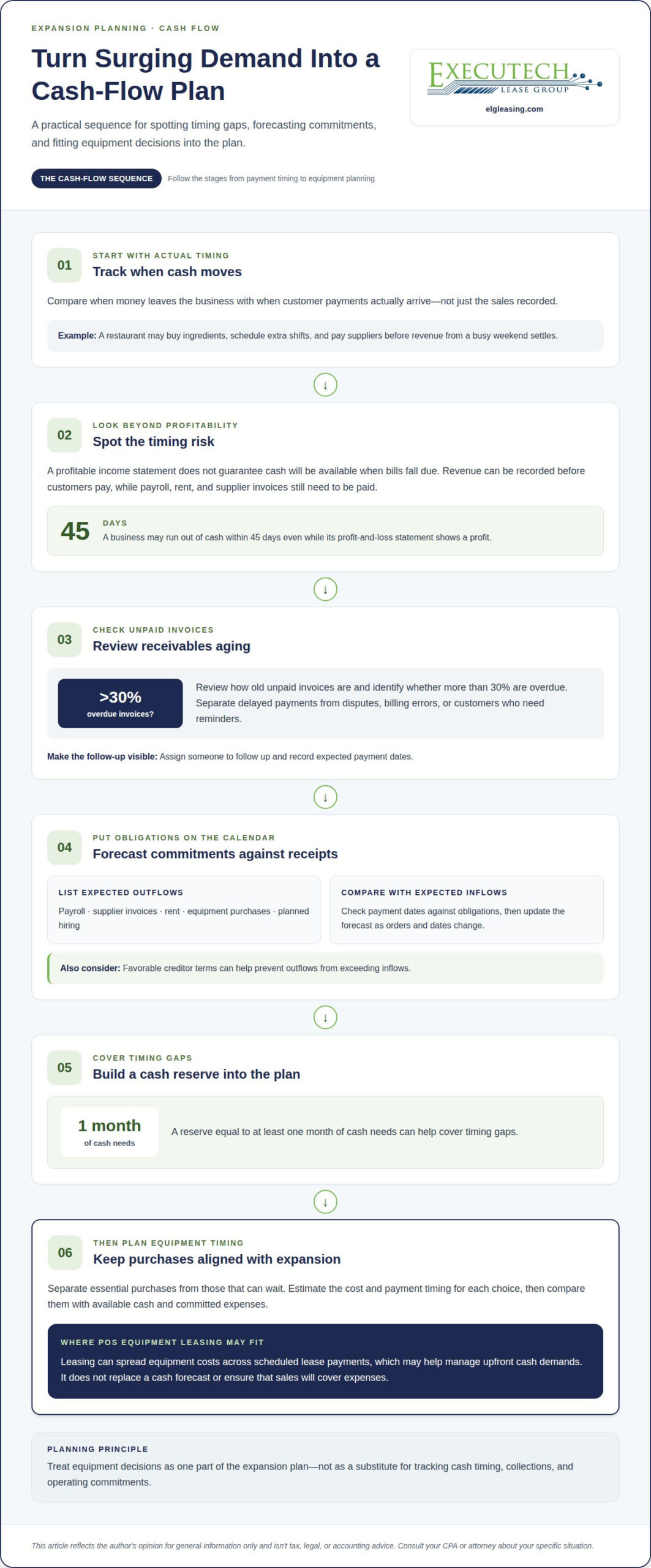
Rising sales can consume cash before it becomes available. A restaurant, for example, may need to buy ingredients, schedule extra shifts, and pay suppliers before revenue from a busy weekend settles. Outstanding customer invoices can widen that gap, leaving less working capital for ordinary bills. Track when money leaves and when customer payments actually arrive, not just the sales recorded.
A profitable income statement doesn’t guarantee cash is available when bills fall due. A business may run out of cash within 45 days even while its profit-and-loss statement shows a profit. The practical warning is timing: revenue can be recorded before customers pay, while payroll, rent, and supplier invoices still require payment. Forecast those dates together to spot a shortfall early.
Accounts receivable aging offers a useful early check. Review the age of unpaid invoices and identify whether more than 30% are overdue. Then separate delayed payments from disputes, billing errors, or customers who need reminders. A growing sales pipeline won’t cover operating costs if completed work remains uncollected. Assign someone to follow up and record expected payment dates.
Build a cash forecast around actual obligations. List payroll, supplier invoices, rent, taxes, equipment purchases, and planned hiring. Compare those outflows with expected receipts, then update the forecast as orders and payment dates change. A reserve equal to at least one month of cash needs can help cover timing gaps. Favorable creditor terms can also help prevent outflows from exceeding inflows.
Surging demand can make equipment decisions feel urgent, especially before a new location opens. Separate essential purchases from those that can wait. Estimate the cost and payment timing for each choice, then compare it with available cash and committed expenses. A POS purchase should fit the expansion plan rather than compete unexpectedly with payroll or inventory funding.
POS equipment leasing can spread equipment costs across scheduled lease payments, which may help manage upfront cash demands. It doesn’t replace a cash forecast or ensure that sales will cover expenses. If leasing fits your equipment plan, you can begin a POS equipment lease application as one part of planning your expansion.
High demand does not remove collection risk: unpaid or outstanding invoices can reduce a startup’s working capital. Regularly missing supplier payments may signal financial strain when customer invoices must arrive first. Keep at least one month of cash reserves.
3. Operational consistency across locations
Each new location creates another opportunity for everyday procedures to drift. One store may apply discounts consistently, while another handles returns differently. A shared POS setup can support common transaction workflows and give managers comparable sales records. But technology alone will not create consistency. Staff need clear procedures, training, and ongoing oversight.
How do POS systems scale across multiple locations and sales channels? A scalable setup brings activity from each location into a common operational framework, with consistent product records, transaction processes, and reporting. For online and in-store sales, align product information and order-handling steps so teams can see how each channel affects inventory and service.
Write down the routines every location must follow. Include opening and closing procedures, discount approval, refunds, voids, and end-of-day reconciliation. For example, if one manager approves a price adjustment, define the same approval path for other locations. Clear rules reduce avoidable variation and help leaders distinguish a local issue from a wider process problem.
Training turns those rules into repeatable work. A new cashier should learn the same checkout sequence, product lookup method, and escalation process as an experienced employee. Use demonstrations and practice transactions before staff serve customers independently. When procedures change, communicate the update across every location rather than relying on informal instructions passed between shifts.
Reports also need consistent definitions. If one location classifies a product differently, sales comparisons can mislead management. Standardize product names, categories, discount labels, and return reasons before reviewing location-level results. Then set a regular review routine: compare sales patterns, inventory adjustments, refund activity, and recurring transaction errors. Investigate unusual differences with the local team before changing a company-wide process.
Thousands of Starbucks and McDonald’s locations rely on designed systems, extensive training, and continuous monitoring to support consistency. The same principle applies to a growing business: establish standard practices first, then reinforce them through management reviews. A POS can make shared records easier to access, but managers still need to observe how teams follow those processes.
Allow room for local operating needs. A location with a different menu, service flow, or customer pattern may need approved variations. Document the reason, assign an owner, and decide how the variation appears in reports. This structure preserves useful local flexibility without creating disconnected procedures that make performance difficult to assess.
As you add channels or locations, treat each change as an operational rollout. Define the shared workflow, train affected staff, test reporting, and monitor early transactions. If a new channel changes how orders are received or fulfilled, update procedures and communicate responsibilities before launch. Repeatable systems make growth easier to oversee without assuming every location works identically.
4. Monitoring existing operations while opening new locations
Opening a location creates work beyond the launch itself. Managers still need to monitor established sites, resolve operating issues, and maintain customer standards. If leadership focuses entirely on the new outlet, existing teams may lose access to decisions and direction. Assign a named owner to each established location during the expansion, with clear responsibility for monitoring daily performance.
Set a review rhythm before opening day. For example, compare each location’s sales reports, refunds, voids, inventory adjustments, and customer feedback during regular management reviews. A sudden change in one measure gives leaders a reason to investigate. Ask the local manager what changed, then distinguish a temporary disruption from a pattern that needs corrective action.
Protect time for site visits and manager check-ins. Put them on the calendar alongside construction, hiring, and launch tasks. A brief review with an established location’s manager can surface staffing gaps or service problems before they grow. Keep a written record of decisions, owners, and follow-up actions so an urgent opening task does not erase a previous commitment.
Expansion pace matters. A Pizza Hut manager described adding three units to one market as too fast because the team was still trying to settle in. That example highlights a practical warning: if managers cannot stabilize new operations while monitoring existing ones, another opening may stretch their attention further. Review launch readiness and oversight capacity together before setting the next opening date.
Experienced area managers can balance new outlet openings with standards at established outlets. They can recognize which tasks need immediate attention and which routines must remain protected. Give these managers visibility across locations, authority to raise operational concerns, and a way to escalate issues. Without that structure, leaders may learn about a slipping standard only after customer complaints appear.
Use a launch plan that includes existing sites. Before opening, document who covers each location, which decisions require leadership approval, and how teams report problems. During the launch, review new-site performance alongside established-site indicators. Afterward, record what disrupted routine operations and adjust the next opening plan. This makes each expansion a source of practical learning.
Technology can help leaders see activity across locations, but reports need consistent definitions and timely review. For example, a manager comparing refund activity must know that each site records refunds the same way. Pair shared reporting with direct conversations, because a number alone may not explain a staffing issue, training gap, or local customer concern.
Expansion is outpacing oversight when leaders repeatedly postpone reviews of established sites, managers lack time to coach teams, or recurring problems remain unresolved. Treat each missed review as a signal to reassess responsibilities and opening pace. The goal is not to stop growth; it is to keep established operations visible while the new location finds its footing.
5. Risks of rapid business expansion
Expansion magnifies weak spots. Before adding capacity, confirm that customer demand is consistent and orders exceed what current teams can deliver. A short-lived rush may not support permanent overhead. For example, compare repeat orders with service capacity before committing to another location. Decisions based on a brief spike can leave a business carrying costs without steady demand.
Overloaded teams can make errors that damage customer experience and reputation. A store adding a new location may need more trained service staff before launch, not after queues lengthen. Plan hiring and orientation around the expected workload. If managers hire whoever is available instead of people suited to the work, staffing pressure may be driving decisions.
Watch customer feedback for early signs of slipping quality. Complaints about incorrect orders, slow service, or inconsistent products can reveal strain before sales reports do. Assign someone to review feedback, group recurring issues, and bring them to the responsible manager. Then address the cause, such as rushed training or unclear procedures, rather than treating each complaint in isolation.
Adding products can create extra work across sales, service, distribution, and inventory. A retailer introducing a new product line, for example, needs accurate product records and staff who can answer customer questions. Map those operational effects before launch. If a new offering complicates fulfillment or distracts staff from core products, narrow the rollout and protect quality control.
Keep overhead aligned with realistic operating capacity. New rent, payroll, inventory, and equipment create obligations even if demand slows. Review each planned expense against expected sales and the work required to deliver the product or service. A growth plan should account for setbacks too. If daily demands repeatedly consume leadership attention, revisit priorities and simplify the expansion strategy.
US businesses need to protect payment data and follow applicable payment-network and tax requirements. PCI DSS is a payment-card security standard, not a law; tax settings and obligations depend on the business and its locations. Configure checkout and records accordingly, and have tax treatment reviewed by a CPA or attorney.
A POS system that cannot keep pace may contribute to slow checkout, inaccurate inventory, inconsistent records, or limited visibility across locations. These problems can disrupt service and complicate management decisions. Identify the specific bottleneck first: transaction handling, reporting, inventory workflows, or access to location-level information. Then determine whether process changes or a system change will address the cause.
This article reflects the author’s opinion for general information only and isn’t tax, legal, or accounting advice. Consult your CPA or attorney about your specific situation.
Executech Lease Group (ELG Leasing)
Executech Lease Group (ELG Leasing) helps businesses address POS equipment needs as they expand locations or replace equipment that no longer fits their operations. Its 12-60-month credit card and POS equipment leases, lease-to-own programs, and fair market value (FMV) lease options give businesses different structures to consider for acquiring payment-processing equipment, including Clover devices. Leasing can help plan equipment acquisition, but it won’t resolve staffing, process, or management issues that also affect growth.
Consider POS system leasing when equipment needs are part of a broader expansion plan and you want to evaluate lease structures alongside operational requirements. Contact Executech Lease Group (ELG Leasing) to discuss your equipment plans and next steps.
Make the next equipment decision part of your growth plan
If your business is growing too fast for its current POS, treat the next equipment decision as part of a broader operating plan. Identify the specific constraint first, whether it affects transactions, location oversight, or daily workflows. Then align any equipment change with your expansion priorities and cash-flow planning. A clear decision can help you scale deliberately instead of reacting to pressure at each new opening.
Executech Lease Group (ELG) offers leasing options for POS systems and credit-card terminals as you plan for growth. Outline your expansion needs and the role payment-processing equipment must play, then review the available leasing structures. Start a conversation with ELG about your equipment plans and next steps.
Keep building at a pace your people, processes, and systems can support. Thoughtful planning gives your next stage a stronger foundation.
This article reflects the author’s opinion for general information only and isn’t tax, legal, or accounting advice. Consult your CPA or attorney about your specific situation.
Frequently Asked Questions
Can companies grow too fast?
Yes, a company can expand faster than its people and systems can support. For example, a retailer might open another location while its only experienced manager trains new hires, leaving routine decisions unanswered. The key test is whether the business can meet added demand without persistent delays, quality slips, or neglected existing work. If it cannot, pause new commitments and reset priorities before expanding further.
What happens when companies scale rapidly?
Rapid scaling adds coordination demands across suppliers, staff, products, and leadership. A supplier may need larger, more frequent orders, while new employees need supervision before working independently. Decisions can bottleneck with a few leaders, and customer experience may vary between locations. Expansion can also expose a weak product mix: adding offerings before confirming demand ties up inventory and attention. Review these pressures together before committing to more capacity.
What are the signs a business has outgrown its POS system?
A business growing too fast for its current POS may rely on manual workarounds for ordinary tasks. Watch for staff re-entering sales data into spreadsheets, delayed product setup, or managers unable to produce the same report consistently across locations. Another signal is when routine changes, such as updating a price, require repeated corrections at separate registers. Track recurring workarounds and identify which system limitation causes them.
This article reflects the author’s opinion for general information only and isn’t tax, legal, or accounting advice. Consult your CPA or attorney about your specific situation.

Article by
Robert Ensminger
Robert Ensminger is the founder and CEO of Executech Lease Group (ELG Leasing), which specializes in equipment leasing and financing solutions for the merchant-services, payments, POS, and FinTech industries. With more than 20 years of industry experience, Robert helps ISOs, payment processors, POS providers, and software companies build practical equipment leasing programs. He founded ELG in 2010. His work focuses on responsive service, transparent program structures, subscription and SaaS-monetization programs, and helping ELG’s partners close more business while creating sustainable revenue.