What if your payment equipment still works but no longer fits the way your business operates? A POS system can become outdated before it fails, especially as workflows, software, and payment needs change. Avoiding technology obsolescence with leasing starts with planning for those changes, not assuming a lease will automatically provide newer equipment.
It’s reasonable to want a clear financing period and a planned time to review your equipment. Leasing can be one way to structure equipment financing around your business plans, but the agreement matters. Before committing, compare the lease term and end-of-term provisions with your intended equipment use, and identify any dependencies between new hardware and your existing payment setup.
This guide explains what obsolescence can mean for POS and payment equipment, how leasing may fit into lifecycle planning, and what to weigh when comparing lease structures. You’ll also learn why a lease doesn’t guarantee upgrades or protect you from technology changes, and which questions to resolve before choosing equipment and terms.
Key Takeaways
- Assess POS equipment by whether it still meets operational needs, not just whether it powers on.
- Map each device’s role, integrations, and requirements to spot dependencies before planning a refresh.
- Compare leasing and ownership by timing, financing structure, and end-of-term responsibilities.
- Avoiding technology obsolescence with leasing starts with review points and clear questions, not assumptions about automatic upgrades.
- Explore how Executech Lease Group (ELG) leases POS systems, payment terminals, and ATMs as part of an equipment lifecycle plan.
What Technology Obsolescence Means for POS and Payment Equipment
Payment equipment becomes obsolete when it no longer meets your business needs. It may still power on and perform its original function, yet fail to fit the way transactions are handled today. That distinction matters. A POS system, card terminal, or ATM can become operationally unsuitable because workflows or connected systems have changed, even when the hardware hasn’t failed.
Obsolescence is about usefulness, not just age. A payment setup can lose value when processes or requirements move beyond what the existing equipment supports. The relevant question isn’t simply “Does the device work?” It’s “Does this device still fit the job it needs to do?”
How payment technology can become outdated
Transaction workflows evolve. A business might change how staff take payments, where transactions happen, or how sales information moves through its operations. Software, integrations, and device requirements can each change on their own schedule. For example, a terminal may still accept transactions while the surrounding workflow depends on information or connections the existing setup doesn’t accommodate.
That doesn’t mean every older device is obsolete, or that a particular brand, model, or processor will inevitably stop fitting. Evaluate equipment in context. List what each device does, which systems and workflows depend on it, and whether it still serves those needs. This inventory gives you a clearer basis for lifecycle planning than the device’s age alone.
Obsolescence is not the same as a broken device
A broken device can’t perform its intended function. Obsolete equipment may function normally but no longer suit current operations. Keep those assessments separate: physical condition tells you about the hardware, while compatibility and workflow fit tell you whether it remains useful in your setup. A working terminal, for instance, could be unsuitable for a changed checkout process even if it has no physical fault.
Consider a business that changes how employees handle transactions. Its card terminal may still turn on and process payments, but the new workflow may require the device to fit into a different sequence of steps or connect with other parts of the payment setup. The issue is suitability, not necessarily failure.
Before treating a device as ready for replacement, document its role, the tasks it supports, and the dependencies around it. Then identify what has changed and where the mismatch occurs. A POS system, card terminal, and ATM may each serve different functions, so assess them individually rather than assuming the entire setup has one lifecycle.
Avoiding technology obsolescence with leasing begins with that operational picture. Leasing can be considered later as a way to structure equipment financing, but it can’t determine whether a device fits your workflow or guarantee that your needs won’t change. Start with the equipment and the work it must support. Clear requirements make lifecycle planning more practical.
How Leasing Affects Payment-Technology Lifecycle Planning
Leasing structures the cost of payment equipment over a defined term. That gives you a financing period to consider alongside your equipment plan, but it doesn’t stop technology or business needs from changing. A lease term is one planning input. It isn’t a guaranteed refresh date, an automatic replacement, or a promise that newer equipment will be available during the term.
Leasing can structure refresh planning, but it cannot guarantee future upgrades. Keep that distinction in view as you compare options. You can set internal dates to review your POS systems, card terminals, or other payment equipment without assuming the contract provides an upgrade right at each review.
Match the lease term to the planning horizon
Start with the period you expect the equipment to fit your operating needs. Consider how long you plan to use the setup, whether your workflows may change, and how the equipment fits into the broader payment environment. These are planning questions, not predictions. The right term depends on your circumstances, and no single duration fits every technology roadmap.
ELG equipment lease terms include 12, 24, 36, 48, and 60 months. Compare the available term options with your expected use period and planned review dates. For example, if you have a reason to reassess your payment setup before a longer term ends, consider how that review fits with your lease obligations. A longer term may fit some plans, but it may be less aligned with a business anticipating earlier operational changes.
Don’t treat the term as a forecast of how long technology will remain suitable. Use it to test whether the financing period, the equipment’s expected role, and your internal review schedule make sense together. If those timelines differ, note the mismatch and consider how it affects your decision.
Plan for change without assuming automatic replacement
A review point is a date for your business to assess its needs. It isn’t a contractual upgrade entitlement. ELG doesn’t promise mid-term upgrades, trade-ins, or replacement equipment, so don’t build a refresh strategy around those assumptions. Before committing, read the agreement’s term and end-of-term provisions carefully, and understand what responsibilities apply when the lease ends.
Keep the process practical: schedule a review, assess whether the equipment still fits, then make decisions based on your operating needs and the contract. If those needs change during the lease, the review can help you identify the issue, but it doesn’t change the agreement by itself.
Avoiding technology obsolescence with leasing means coordinating the financing structure with a realistic lifecycle plan, not relying on the lease to manage technology changes for you. Vendors exploring an equipment-leasing partnership can use the Become a Vendor inquiry form to start a partnership conversation.
Leasing vs. Ownership: Weighing Obsolescence and Timing Risks
Ownership and leasing shape how you pay for payment equipment and when you consider a refresh. Neither choice determines whether a POS system, card terminal, or ATM will remain suitable as your operations change. Compare the responsibilities and timing questions attached to each structure, then weigh them against your business’s plans.
Timing flexibility
Ownership: You generally decide when to replace owned equipment, while balancing its continued usefulness against your operational needs.
Leasing: The agreement sets a defined term. Its timing can inform your planning, but it doesn’t guarantee a refresh or an upgrade.
Financing structure
Ownership: You purchase the equipment and manage its lifecycle as the owner.
Leasing: Payments are structured over a lease term. That arrangement may suit your equipment plan, but it doesn’t establish that leasing will always cost less.
End-of-term questions
Ownership: You decide what to do with the equipment as it ages or no longer fits your needs.
Leasing: The agreement’s end-of-term provisions determine the applicable responsibilities and options. Read them before committing.
What leasing can and cannot shift
Leasing changes the financing arrangement, not your responsibility to make technology decisions. You still need to assess whether equipment fits your workflows and plan for changes in your payment environment. A lease doesn’t transfer every obsolescence, maintenance, or operational risk to the lessor, and it doesn’t mean the lessor automatically absorbs technology risk when the term ends.
Keep these questions separate: how will you finance the equipment, and how will you manage its use over time? A sound answer to one doesn’t settle the other. Any equipment warranty comes only from its manufacturer. Leasing itself isn’t warranty or maintenance coverage.
How lease-end structures affect the decision
Lease-end structure matters. An FMV equipment lease ends with a buyout of about 10% of the original equipment cost. A lease-to-own equipment lease ends with a $1 buyout. These are distinct end-of-lease figures, not monthly payment amounts or statements of total equipment cost. Consider them alongside the agreement’s other terms and your plans for the equipment.
For a closer look at equipment lease structures, review ELG’s leasing programs. Avoiding technology obsolescence with leasing means evaluating financing terms without mistaking them for a technology guarantee. Ownership and leasing both leave you with decisions to make. Neither guarantees compatibility with future systems, future upgrades, or freedom from operational risk.
A Practical Checklist for Reducing POS Technology Obsolescence Risk
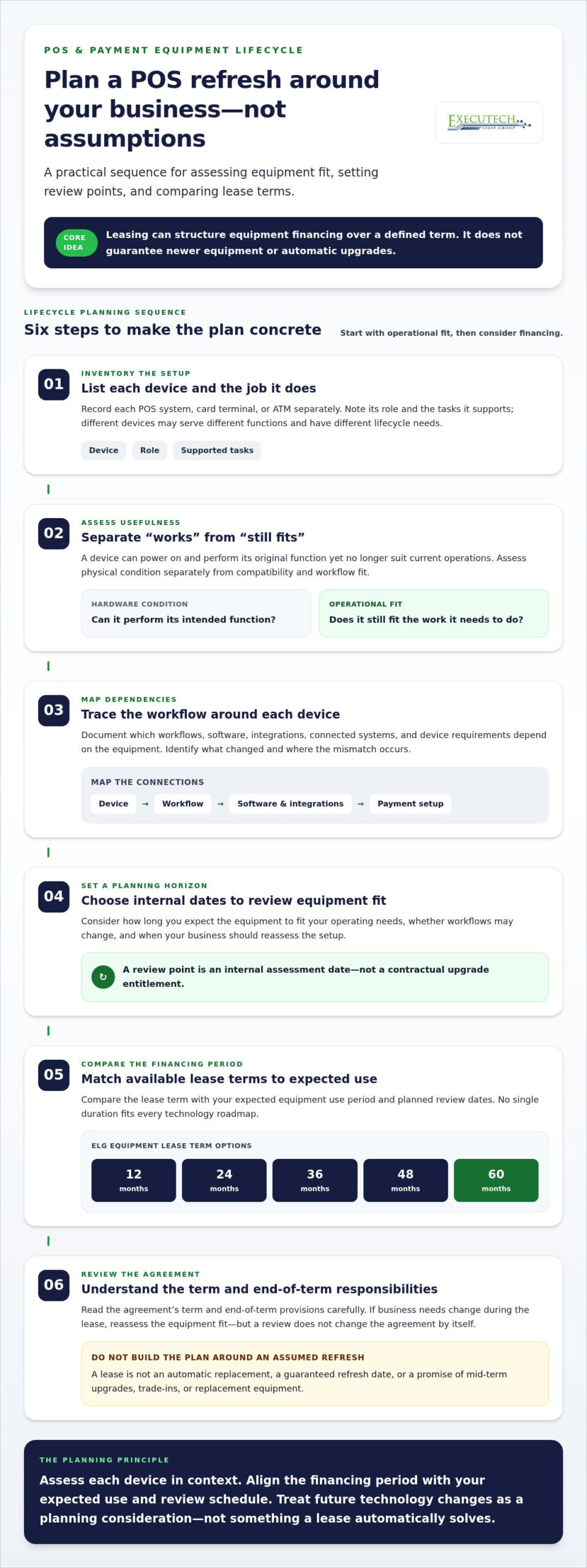
A simple record of your equipment, workflows, and lease terms makes future decisions easier to organize. Use this five-step checklist to identify what your payment setup supports today, where changes could affect it, and when to review whether it still fits. Avoiding technology obsolescence with leasing starts with clear requirements, not assumptions about what a contract will do.
Map devices, workflows, and dependencies
Begin with the equipment in use and the work each device supports. Include POS systems, card terminals, and ATMs, then note relevant integrations and processor relationships as part of the setup. Recording these details helps you assess fit without assuming every device works with every system.
- Map current equipment. Record each device, its business role, and the payment workflow it supports. Separate equipment that performs different tasks rather than treating the setup as one unit.
- Identify dependencies. Note the software, integrations, processor relationships, and other operational requirements connected to each device. Mark dependencies that could matter if a workflow or system changes.
- Set review points. Schedule reviews during the equipment lifecycle, not only at the lease’s end. Revisit the inventory when planned operational changes arise and at regular points in your planning calendar.
- Compare terms. Compare the equipment’s expected period of use with the proposed lease term. Review the agreement’s payment structure, end-of-term provisions, and ongoing obligations alongside your lifecycle plan.
- Document questions. Keep a written record of unresolved details about equipment roles, dependencies, contract responsibilities, and planned changes. Assign someone to revisit those questions at each review point.
Review timing, obligations, and open questions
Use each review to consider whether the setup still meets operational requirements and whether planned changes affect the equipment’s role. A useful payment-equipment review checks both operational fit and lease timing. This keeps technology decisions connected to the agreement without treating a review date as an automatic refresh or contract change.
Read the actual agreement for end-of-term choices and ongoing obligations, then compare those terms with your expected equipment lifecycle. Write down any points you need clarified before committing. Our goal is to deliver credit decisions in under 2 business hours. That window applies to the credit-decision stage only, not later funding or equipment deployment.
Keep the inventory and review notes together. They give your team a practical reference when workflows shift, equipment needs change, or a lease decision comes due.
How ELG Equipment Leasing Fits a Technology-Refresh Strategy
Executech Lease Group (ELG) is an equipment lease brokerage serving the payments-technology ecosystem in the United States. Its equipment focus includes POS systems, credit-card and bank-card terminals, and ATMs. ELG leases can structure equipment financing as part of a refresh plan, but the plan still depends on your operational requirements and the agreement you choose. Leasing doesn’t guarantee that equipment will remain suitable or that a future upgrade will be available.
ELG offers no-money-down equipment leasing, meaning there’s no down-payment requirement. Lease payments and other obligations under the agreement still apply. Keep the scope clear, too: ELG leases payment equipment, but doesn’t provide warranties, maintenance, repairs, replacements, or payment processing. Any equipment warranty comes from its manufacturer.
ELG equipment lease structures in brief
ELG offers equipment lease terms of 12, 24, 36, 48, and 60 months. Options include FMV equipment leases, which end with about a 10% buyout of the original equipment cost, and lease-to-own equipment leases, which end with a $1 buyout. These figures describe distinct lease-end structures. They aren’t monthly payment amounts or a complete statement of equipment cost.
As you review ELG’s equipment leasing programs, consider how the term and lease-end structure relate to your equipment plan. Think about the intended role of the equipment, your anticipated period of use, and the responsibilities you’ll have under the agreement. Neither structure guarantees a refresh, upgrade, or fit with future technology. Read the terms as part of a broader lifecycle decision.
Start a focused conversation about equipment leasing
For vendors, independent sales organizations (ISOs), and payment-services businesses, equipment leasing can be one part of supporting payment-technology needs. A productive partnership discussion can begin with the equipment categories involved, the kinds of businesses you serve, and how leasing could fit into your existing operations. Keep the conversation focused on equipment financing, separate from payment processing and technology support.
Our goal is to deliver credit decisions in under 2 business hours. That applies only to credit decisions, not funding, delivery, or deployment. The Become a Vendor inquiry form is a way for relevant business partners to start a partnership conversation, not an end-user credit application.
Avoiding technology obsolescence with leasing takes clear expectations on both sides: a lifecycle plan for the equipment and a transparent understanding of the lease structure. For vendors, ISOs, and payment-services businesses seeking an equipment-leasing relationship, start with the partner inquiry and outline the payment-equipment needs you want to address.
Make Your Next Equipment Decision Deliberate
Turn your lifecycle notes into a decision brief. Identify the equipment you’re considering, the work it needs to support, the timing you’re planning around, and the lease-end responsibilities that matter to your business. Then assess the lease structure against that brief. Avoiding technology obsolescence with leasing is about making informed equipment and financing decisions, not expecting a contract to predict future needs.
For payment-services businesses and vendors, that preparation can also make a partnership discussion more focused. Bring your equipment priorities and operational context to the conversation, and build from there.
With clear requirements and realistic expectations, you can approach your next payment-technology decision with greater confidence.
Frequently Asked Questions
Can a business change leased POS equipment before the lease term ends?
Not automatically. Your agreement determines what changes are permitted, and ELG doesn’t promise mid-term upgrades, trade-ins, or replacement equipment. If your needs shift, review the contract before acting and identify what it says about your responsibilities. Avoiding technology obsolescence with leasing means planning for change, not assuming you can swap devices during a lease. Record expected changes before signing so you can weigh them against the proposed terms.
Does no-money-down equipment leasing mean there are no ongoing payments?
No. No-money-down means there’s no down-payment requirement, not that equipment is free or that lease obligations disappear. Payments and other obligations under the agreement still apply. Before committing, review the payment schedule and full contract terms so you understand what you’re agreeing to. The absence of a down payment doesn’t remove the need to plan for ongoing lease payments.
How quickly does ELG make a credit decision?
Our goal is to deliver credit decisions in under 2 business hours. That goal refers to the credit-decision stage only. If you’re coordinating an equipment plan with other business decisions, treat the decision window as one step rather than a timeline for the entire process. It doesn’t indicate when equipment will be funded, delivered, or ready for use. Keep those stages separate in your planning.
Does a credit decision mean equipment funding or delivery is complete?
No. A credit decision is not confirmation that equipment has been funded, delivered, or deployed. Those are separate stages, and the decision timeframe doesn’t establish when they’ll happen. If you’re coordinating a change to your payment setup, don’t schedule a transition based only on the credit decision. Keep each stage distinct in your internal plan and make operational timing decisions based on the relevant updates.
Who provides the warranty for leased POS equipment?
Any warranty for leased POS equipment comes from the equipment manufacturer, not ELG. ELG doesn’t provide warranties, maintenance, repairs, or replacements. Before putting equipment into service, review the manufacturer’s warranty information to understand its coverage and how to access it. Keep warranty documentation with your equipment records, separate from the lease agreement, since the lease and manufacturer warranty address different aspects of the equipment arrangement.
Does ELG process card payments?
No. ELG’s role is equipment leasing, separate from payment processing. Your payment-processing relationship handles the processing side of your business; equipment leasing doesn’t make ELG your processor or determine how transactions are handled. Keep those arrangements distinct as you plan a technology change. Track equipment decisions in your lease records and processing arrangements through their own relationship and documentation.
Can ELG guarantee that every terminal will work with every processor?
No. ELG doesn’t guarantee universal compatibility between terminals and processors. A terminal’s suitability depends on the specific payment setup and requirements involved, so don’t assume one device will work across every processing arrangement. Before making an equipment decision, document the processor relationship and the operational requirements the terminal needs to meet. Treat compatibility as a specific setup consideration, not a blanket guarantee.

Article by
Robert Ensminger
Robert Ensminger is the founder and CEO of Executech Lease Group (ELG Leasing), which specializes in equipment leasing and financing solutions for the merchant-services, payments, POS, and FinTech industries. Robert helps ISOs, payment processors, POS providers, and software companies build practical equipment leasing programs. He founded ELG in 2010. His work focuses on responsive service, transparent program structures, SaaS-monetization programs, and helping ELG’s partners close more business while creating sustainable revenue.