Replacing an old POS can make sense when the new system supports your equipment and integrations, and your migration plan accounts for the records you need. When migrating from an old POS to a new leased system, check compatibility before planning the cutover: terminals, printers, and other devices may need reconfiguration or replacement. A trade-in alone doesn’t determine whether switching is worthwhile.
Look beyond the equipment commitment. Data preparation, hardware changes, software setup, and staff training all affect the transition’s cost and workload. The goal is to avoid paying for a system that can’t support your operations or losing access to records you still need.
This guide explains how to assess migration costs, choose which sales history to move or retain, check hardware and payment compatibility, and prepare your team. Use the steps to plan the cutover and compare a new leased POS with your current setup.
Key Takeaways
- Clean and back up records before migration, then decide which sales history, customer details, gift card balances, and loyalty data you need to carry forward.
- Build a realistic cost picture by accounting for possible hardware changes, software and service charges, installation, training, and obligations in your current agreement.
- Check that payment terminals, processors, printers, and essential integrations work with the new POS before setting a cutover date.
- Test ordering, payments, reports, and migrated pricing, and train staff before the new system handles daily service.
- Compare lease-to-own and FMV lease options with your equipment needs and preferred lease term before choosing a POS financing structure.
Sales History: Should You Migrate It?
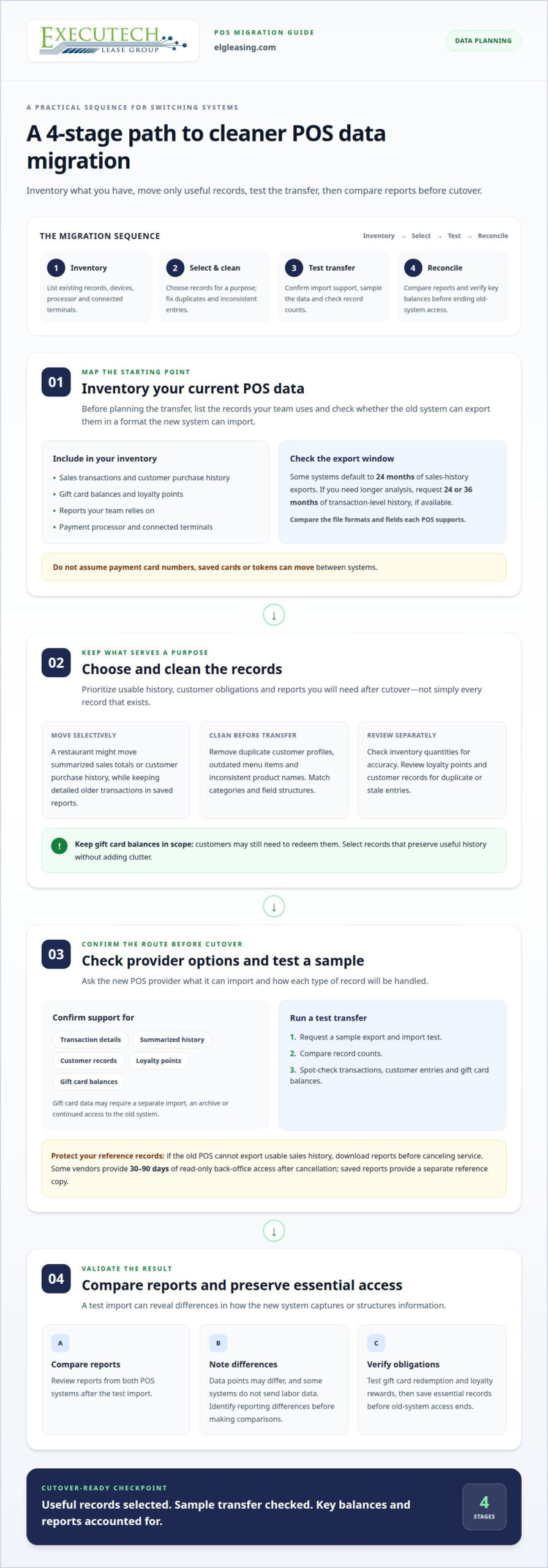
Use four steps to decide which records belong in the new POS. Prioritize usable data, ongoing customer obligations, and reports you’ll need after cutover.
-
Assess Existing POS Data
Inventory your current POS software, hardware, and data before planning a transfer. List sales transactions, customer purchase history, gift card balances, loyalty points, and reports your team uses. Note your payment processor and connected terminals. The old system must export usable data, and the new one must import it. Compare the file formats and fields each system supports.
Some systems default to 24 months of sales-history exports. If you need longer analysis, request 24 or 36 months of transaction-level history, if available. Don’t assume payment card numbers, saved cards, or tokens can move between systems.
-
Choose and Clean Data for Migration
Choose records for their purpose, not simply because they exist. A restaurant might move summarized sales totals or customer purchase history, then retain detailed older transactions in saved reports. Before transferring data, clean duplicate customer profiles, outdated menu items, and inconsistent product names. Match categories and field structures to prevent avoidable duplicates.
Review inventory records separately. Old on-hand quantities may be inaccurate, so importing them without review can produce misleading counts. Check customer records and loyalty points for duplicates or stale entries. Keep gift card balances in scope because customers may still need to redeem them. Select data that preserves useful history without adding clutter.
-
Check Provider Migration Options
Ask the new POS provider which records it can import and how the transfer works. Confirm whether it can handle transaction details, summarized history, customer records, loyalty points, and gift card balances. Gift card data may need a separate import, an archive, or continued access to the old system. Make a separate migration decision for each data type.
Request a sample export and import test before the final transfer. Compare record counts and spot-check transactions, customer entries, and gift card balances. If the old POS can’t export sales history in a usable format, download reports before canceling service. Some vendors provide 30-90 days of read-only back-office access after cancellation, but saved reports give you a separate reference copy.
-
Review Data Differences and Requirements
Compare reports from both POS systems after a test import. The new system may capture different data points, and some systems don’t send labor data. It may also structure or transmit information differently. As a result, new reports may differ from historical records, even when the earlier data hasn’t changed. Identify reporting differences before using the reports for comparisons.
Include PCI DSS in your payment-security review for card data. State and local requirements depend on your location and how your restaurant handles payment and customer data. Review relevant requirements alongside processor expectations before cutover. Test gift card redemption and loyalty rewards, and save essential records before ending old-system access. This keeps customer balances and reporting needs visible throughout the transition.
Hardware, service, reader, and contract costs
Leasing spreads equipment costs across scheduled payments; buying means paying hardware costs upfront. Before switching, check compatibility across POS software, terminals, payment processors, printers, cash drawers, scanners, displays, and computers.
-
Decide What to Do With Old Hardware
List every device and mark it for reuse, return, replacement, or possible trade-in. Include receipt printers, cash drawers, barcode scanners, label printers, payment terminals, customer displays, and computers. Test each device with the new POS before relying on it during service. Don’t assume an older terminal or printer will work just because it connects to your current system.
Check the return obligations in your existing agreement before disposing of leased equipment. Keep any possible trade-in or resale value separate from your migration budget. Don’t assume old hardware will offset the cost of new equipment.
-
Review Lease and Other Costs
Separate equipment payments from software, installation, and training costs. Buying means paying for hardware directly; leasing uses scheduled payments under a contract. Lease-to-own and FMV structures also differ in their end-of-term options. Compare the full agreement, not just the recurring payment.
Include replacement readers, setup, and any required configuration in your cost plan. Review contract length, payment schedule, end-of-term terms, and equipment return requirements. For a POS equipment lease, available terms can run from 12 to 60 months. Choose a structure that fits your equipment needs and planned use.
- Map compatibility before ordering equipment. Compare the new POS software with every device needed for orders, checkout, and reporting. Check receipt printers, cash drawers, scanners, customer displays, and computers. Some devices may need updates, reconfiguration, or replacement. Confirm the payment terminal works with the intended processor and merchant account. Test third-party connections, including online ordering and loyalty programs.
Make a compatibility list by device and task. For example, test whether a kitchen printer receives the right orders and whether the scanner reads inventory labels. A device may power on yet fail at a key workflow. Test the reader and processor together, since terminal compatibility alone doesn’t establish processor compatibility.
- Prepare hardware and software for launch. Identify who handles installation, configuration, and integrations, then schedule each task before cutover. Set up menu or product items, tax settings, order routing, and user access in the new software. Test a full transaction, from order entry through receipt printing and reporting. Test a refund or void workflow and payment-terminal processing before relying on the system during a busy service.
Retail and restaurant workflows may use different devices and order structures, so test the actual setup your staff uses. If equipment acquisition is part of your switch, review POS equipment lease options alongside your hardware plan.
What Is POS Data Migration?
A POS data migration typically involves reviewing the current system, exporting and cleaning records, mapping fields, testing an import, then completing the final import and go-live review. To limit downtime, schedule the switch during a slower period and prepare a fallback way to take orders or payments.
-
Review Existing POS Agreements
Review your current POS contract before selecting a replacement. Mark cancellation fees, written-notice periods, renewal dates, and equipment-return requirements. Agreements may require 30, 60, or 90 days’ written notice to cancel, while automatic renewal may extend a contract by 12 or 24 months. Some require notice 30-90 days before renewal. Record each deadline and plan the transition around it.
Check how your agreement requires hardware to be returned. Keep a copy of its terms and cancellation correspondence with your migration records. Let the reason for switching guide your selection: identify contract limitations or workflow gaps the new system needs to address.
-
Test the Migration Before Go-Live
Run a sample export and test import before the final transfer. Map fields, clean formatting, and compare imported records against the source. Check item names, categories, customer details, and pricing. Review product or menu catalogs line by line: a missing item or incorrect price can disrupt orders after launch.
Use a staging environment when available to catch import errors before they affect live operations. Test payment workflows, reports, and integrations, then document anything that needs correction. At go-live, review the new system’s setup and confirm essential records appear as expected.
- Plan the cutover around operations. Set the final import for a slower service period, and tell staff when the old POS will stop taking transactions. Prepare a fallback method for taking orders or payments if the transition interrupts service. Keep the old system accessible until the new POS works properly and essential records are saved.
Confirm where installation, configuration, and integrations fit in the schedule. For multiple locations, a staggered rollout can help teams learn from the first site before switching others. Focus the cutover plan on the systems and records each location actually uses.
- Review performance after launch. Track transaction processing, reports, integrations, and staff workflows during the first operating period. About 30 days after switching, review system performance and compare it with the issues that prompted the move. Note recurring problems, missing reports, or data fields that changed.
A new POS may send information differently, so its new reports may not match historical records exactly. Keep that distinction clear when comparing results. Update procedures to reflect the new structure, and retain access to saved records needed for later reference.
How Difficult Is It to Switch Restaurant POS Systems?
A restaurant POS switch can take a few days to several weeks, depending on configuration, data needs, and support. A single-location migration typically takes 4-6 weeks; a multi-unit rollout typically takes 6-12 weeks.
-
Communicate the Change to Staff
Tell staff what’s changing, when the new POS launches, and how they’ll get hands-on practice. Explain how the update affects their roles, from entering orders to closing a register. Share a schedule for training, testing, and cutover so employees know which system to use at each stage.
Ask managers to collect questions during pre-launch practice. Servers, for example, may need to know how to split checks, while kitchen staff need to understand order routing. Address these workflows before launch instead of leaving staff to discover changes during service.
-
Train Staff on New Functionality
Train each role on its tasks in the new POS. Have servers enter orders, apply modifiers, and send tickets. Have cashiers process payments, issue receipts, and handle a void. Managers should practice reviewing sales reports and correcting common entry errors.
Use realistic restaurant scenarios, not just a feature tour. For example, have a server change an order after sending it, then confirm the kitchen receives the update. Practice on the actual terminals and platforms staff will use during service.
-
Test the System and Prepare Staff
Run test transactions before go-live, then check order processing, payments, reporting, and integrations. Print receipts, test kitchen tickets, and follow an order from entry through completion. Confirm menu items, prices, and modifiers appear correctly on each relevant screen.
Schedule hands-on practice before cutover, with time to correct errors. For a multi-location restaurant, test the new POS at one location before rolling it out elsewhere. A staging environment can reveal import or configuration problems before they affect live orders.
-
Train Staff and Go Live
Choose a slower service period for cutover, then make the switch from old POS to new POS clear. Assign a manager to coordinate questions and keep staff following the agreed process. Avoid switching systems halfway through service unless your migration plan requires it.
Prepare a fallback method for taking orders or payments if the new POS becomes unavailable. Monitor the first 14 days for recurring workflow issues, missing reports, or staff questions. Record each problem and its resolution so managers can update training and reinforce the correct steps.
Checking POS system compatibility
Compatibility means more than whether a terminal powers on. When migrating from an old POS to a new leased system, check each device, platform, and workflow before switching.
- Map every device to its daily task. List the payment terminals, receipt printers, cash drawers, barcode scanners, customer displays, and computers used at each register. Match each device to a task, such as printing kitchen tickets or scanning inventory. Compare the list with the new POS requirements. A printer that works for receipts may not support your kitchen-ticket workflow.
- Confirm payment processing compatibility. Identify the processor and merchant account planned for the new setup, then confirm the payment terminal works with both. A compatible POS doesn’t automatically mean your existing reader is compatible with the processor. Test a payment from order entry through authorization and receipt. Include refunds and voids so employees can handle those transactions before live service.
- Trace the software and integrations. List third-party platforms connected to the current POS, including online ordering and loyalty programs. For each, identify what information it sends or receives. Test a sample online order from submission through kitchen routing, and check whether loyalty points appear correctly. An integration may connect successfully yet pass incomplete information or route orders to the wrong station.
- Compare operational data and reporting. Run the same test workflow in both POS systems, then compare the resulting reports. Check sales categories, employee activity, labor information, and transaction details. The new system may provide different data points or send information in a different structure. Record those differences before comparing new reports with historical results.
- Test the complete setup before cutover. Use a staging environment when available, and run orders through each important device and integration. Confirm scanners read expected items, printers produce the right tickets, and payment terminals process transactions. A compatibility matrix is especially useful when migrating from an old POS to a new leased system. For multiple locations, test one site before rolling out the same configuration elsewhere.
Executech Lease Group (ELG Leasing): Lease-to-Own Programs
Executech Lease Group (ELG) offers POS and credit card equipment leasing, including Clover devices. If your migration plan includes new POS hardware, ELG’s lease-to-own and FMV options offer different structures to consider. The right fit depends on how you want to handle the equipment at the end of the lease and manage its cost over the term.
Bring your equipment needs and preferred lease structure to the discussion. This gives you a focused starting point for considering POS equipment leasing alongside your transition plan.
Contact Executech Lease Group to discuss your POS equipment leasing needs.
Set Your POS Transition Up for the Next Stage
Use the migration decision to align equipment financing with your restaurant’s operating plans. A new POS should fit your intended workflows and payment setup, while its financing structure should match how you want to manage equipment over time. Treat the lease decision as part of your broader transition plan, not an afterthought.
Executech Lease Group (ELG Leasing) offers 12-60 Month Credit Card and POS Equipment Leases, Lease-to-Own Programs, and FMV Lease Options. These choices give you different ways to structure POS equipment acquisition. As you plan on migrating from an old POS to a new leased system, consider which option best fits your equipment needs and preferred approach at the end of the lease.
Bring your POS equipment plans to the next conversation. A clear starting point keeps the financing decision connected to your migration priorities.
Move forward with a plan built around how your restaurant operates.
Frequently Asked Questions
Is It Worth Trading In Your Old POS System?
A trade-in may be worthwhile if its value makes sense compared with your remaining obligations and the equipment’s usefulness to your business. Start by identifying whether you own each device and whether it still supports a needed workflow. Then compare the offer with keeping the hardware for a defined purpose, such as a backup station. Don’t treat possible trade-in value as guaranteed funding for the new setup.
What Data Can Be Moved from an Old POS System?
Data that the old system can export and the new one can accept may be transferred, but the key question is which records support your next decisions. A manager, for example, may need item-level sales for menu planning, while a bookkeeper may rely on period summaries. Define the reports each role needs, then keep separate copies of records that won’t serve a direct operational purpose in the new POS.
Can You Keep Your Existing Payment Processor When Switching POS Systems?
You can keep your existing processor if it supports the new POS and planned payment setup. The processor relationship is separate from equipment leasing, so a lease doesn’t determine processor terms or transaction pricing. Clarify which party handles processing, the merchant account, and terminal setup. This separation helps prevent confusion about who controls each part of your payment arrangement.
Should You Cancel Your Old POS Immediately After Switching?
No. Plan cancellation around your agreement’s notice and equipment-return requirements, and preserve access needed for returns or customer questions. A practical transition might keep one register connected to the old POS until the return process is complete. Set an internal end date for old-system access, and assign responsibility for retrieving remaining records. This avoids leaving staff unsure which system to consult.
What Data May Not Transfer Cleanly?
Custom fields, unusual report layouts, and information stored in a format the new POS can’t interpret may need separate handling. Labor data is another possible gap because systems don’t all send the same labor information. Decide which fields are essential for daily operations and which are needed only for historical reference. This helps you plan for reports that won’t match one to one after the change.
What Happens to Existing Gift Cards and Loyalty Rewards?
Keep existing balances and rewards understandable to staff and customers during the transition. Prepare a lookup procedure for questions about a card or rewards account, and explain how employees should handle a redemption that doesn’t appear in the new POS. Record the applicable balance or points and make the process clear at checkout. This reduces confusion without assuming every record behaves identically after migration.
What POS Data Can Be Transferred, Including Products, Inventory, Customers, and Sales History?
Potential transfer categories include products, departments, categories, vendors, barcodes, prices, inventory quantities, customer records, account information, and sales history. Each category may have different fields and import requirements. A barcode, for instance, may accompany an item record, while its inventory quantity needs separate validation. Treat these as distinct data groups in your migration plan; a successful product import doesn’t mean every record type transferred correctly.
How Much Does It Cost to Lease a POS System in the United States, Including Setup and Transaction Fees?
The lease cost depends on the equipment and lease structure. Setup costs depend on what the equipment arrangement includes; installation and training may be part of lease financing when an ISO bundles them with the equipment. Transaction fees belong to the payment-processing relationship, not the equipment lease. Executech Lease Group doesn’t process payments or set transaction pricing, so budget for those costs separately.
This article reflects the author’s opinion for general information only and isn’t tax, legal, or accounting advice. Consult your CPA or attorney about your specific situation.

Article by
Robert Ensminger
Robert Ensminger is the founder and CEO of Executech Lease Group (ELG Leasing), which specializes in equipment leasing and financing solutions for the merchant-services, payments, POS, and FinTech industries. With more than 20 years of industry experience, Robert helps ISOs, payment processors, POS providers, and software companies build practical equipment leasing programs. He founded ELG in 2010. His work focuses on responsive service, transparent program structures, subscription and SaaS-monetization programs, and helping ELG’s partners close more business while creating sustainable revenue.