
The device is only one part of a mobile POS decision. Mobile POS device leasing solutions can help businesses structure access to payment-technology equipment without a large upfront equipment purchase. The lease structure, checkout workflow, and payment-processing responsibilities still need to be considered separately.
If you’re equipping staff for mobile sales, pop-up locations, or checkout on the move, start with the job the system needs to do. Define who will use the equipment, where transactions will happen, and how checkout fits into daily operations. Then compare the lease term and end-of-term option against those needs.
This guide explains what to define before discussing a lease, how FMV and lease-to-own structures differ, and why equipment leasing is separate from payment processing. It also explains how Executech Lease Group (ELG) fits into equipment leasing and what its Become a Vendor inquiry is for.
Key Takeaways
- Map where transactions happen and who uses the devices before narrowing your mobile POS equipment requirements.
- Compare mobile POS device leasing solutions by equipment needs, lease term, scheduled obligations, and end-of-term option.
- ELG’s FMV leases end with about a 10% buyout; lease-to-own leases end with a $1 buyout. Term choices are 12, 24, 36, 48, and 60 months.
- Prepare your equipment category, merchant workflow, business contact details, and lease questions before making an inquiry.
- Keep equipment leasing separate from payment processing. ELG leases payment-technology equipment; processing responsibilities remain separate.
What Mobile POS Device Leasing Solves in a Real Checkout Workflow
Mobile POS device leasing is an arrangement for using payment-technology equipment under a lease, with scheduled obligations over an agreed term. It can provide an alternative to paying for all the equipment upfront. The lease concerns the equipment, not the services that authorize and process transactions.
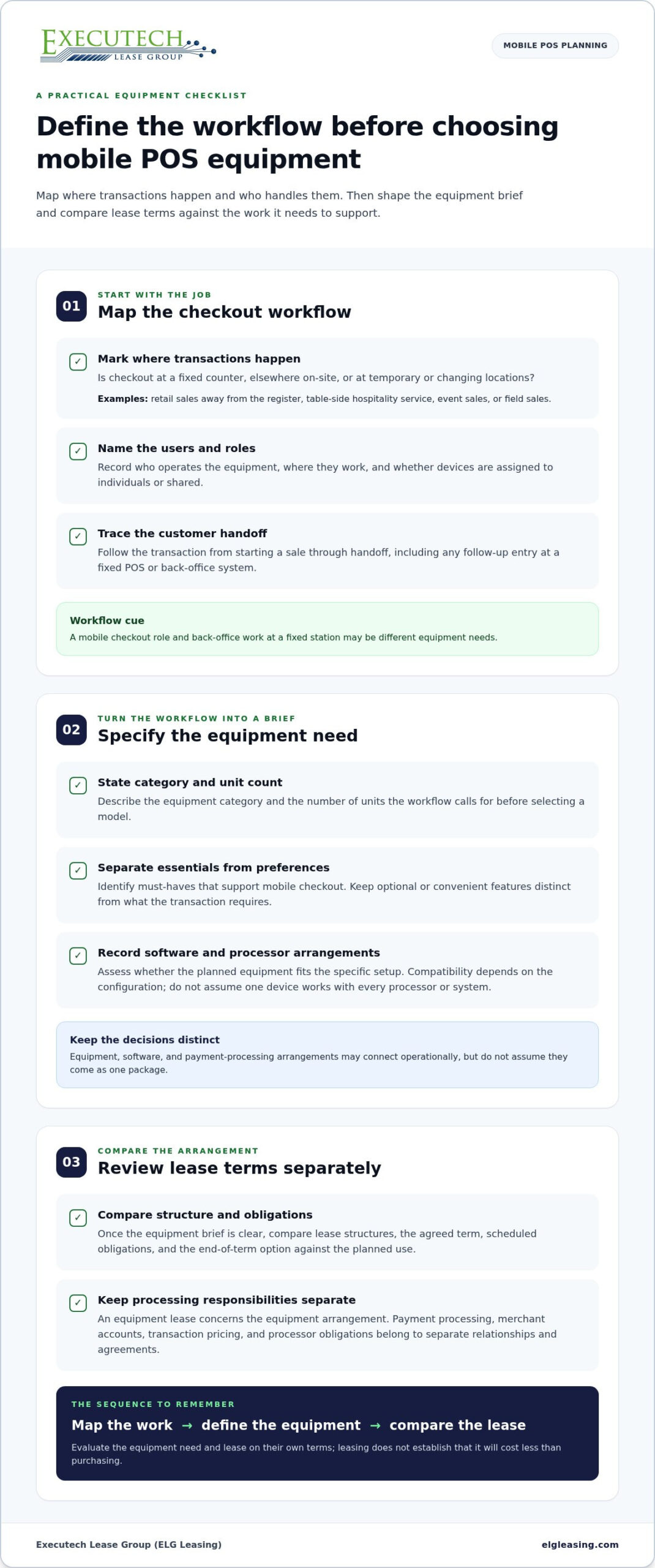
Define the checkout workflow first, then decide how to finance the equipment. Start by mapping where transactions happen, who operates the devices, and whether checkout moves with staff or stays at a counter. Once you have an equipment brief, compare lease structures against the planned use. Mobile POS device leasing solutions are best evaluated in the context of your actual checkout tasks, rather than as a one-size-fits-all equipment category.
Where mobile checkout changes the equipment brief
A fixed-counter setup and a mobile checkout workflow create different equipment needs. Retail staff might complete a transaction away from the register or serve customers at another point in the space. Hospitality teams may take payment as part of table-side service. Event sellers and field sales staff may handle transactions at temporary or changing locations. These examples describe workflows, not a guarantee that a particular device will suit every environment.
Before narrowing equipment options, answer two practical questions: where will transactions happen, and who will use the equipment? These answers help distinguish a portable checkout need from a fixed-counter POS requirement. Use the workflow to define the equipment brief before selecting a device.
What leasing does, and does not, cover
A lease establishes scheduled obligations for equipment over an agreed term. It changes how you arrange access to equipment, but does not establish that leasing will cost less than purchasing. Compare the lease structure and end-of-term terms alongside the equipment need. ELG’s equipment leasing programs include FMV and lease-to-own structures.
Keep the responsibilities distinct. Equipment leasing concerns the equipment arrangement. Payment processing, a merchant account, and transaction pricing belong to separate relationships and agreements. ELG does not process payments, supply merchant accounts, or set transaction pricing or processor obligations. Equipment access and payment acceptance are separate decisions.
- Map the location: Identify whether checkout happens at a fixed counter, elsewhere on-site, or at changing locations.
- Name the users: Consider which roles will handle transactions and where they will work.
- Separate the agreements: Keep equipment lease obligations distinct from payment-processing and merchant-account terms.
This gives you a clearer equipment brief before comparing lease structures. Define how the equipment will be used, then assess the lease on its own terms.
How to Match a Mobile POS Device to Your Operating Needs
Choose equipment by starting with the work it needs to support, not by browsing features first. A clear brief helps separate essential mobile checkout requirements from optional functions and software decisions. It also gives you a practical basis for comparing mobile POS device leasing solutions, because you define the equipment need before weighing lease terms.
Map users, transaction locations, and checkout tasks
Write down who will handle transactions, where they’ll take place, and what the customer handoff looks like. Expected transaction volume can be useful for planning, but it does not guarantee device performance. Keep the mobile checkout role distinct from back-office POS tasks, such as work staff complete at a fixed station after a transaction.
- Map transactions: Note where sales happen and whether checkout stays at one station or moves with staff.
- Identify users: Record which roles will operate the equipment and whether devices are assigned to individuals or shared.
- Define equipment: Specify the equipment category and number of units your workflow calls for. State the need before selecting a model.
- Review the workflow: Trace the process from starting a sale through customer handoff and any follow-up entry at a fixed POS or back-office system.
- Compare lease terms: Once the equipment brief is clear, compare available lease structures and obligations against the planned use.
Define equipment and compatibility questions
Separate must-haves from preferences. A must-have supports the mobile checkout task; an optional feature may be convenient but not essential to the transaction. Treat software selection as a separate decision, too. Equipment, software, and payment-processing arrangements may connect operationally, but don’t assume they come as one package.
- Describe the equipment category and intended merchant workflow in plain terms.
- Record the processor and software arrangements involved in the setup.
- Assess whether the planned equipment fits those arrangements. Compatibility depends on the specific configuration, so don’t assume one device works with every processor or system.
This detail makes the equipment brief more precise without confusing a lease with processing services. Keep transaction pricing and merchant-account terms separate from equipment financing, then compare the lease structure against the equipment you’ve defined.
Vendors, ISOs, and MSPs exploring a relationship with ELG can use the Become a Vendor form to make an inquiry. The form is for a vendor inquiry, not a merchant financing application.
Compare Mobile POS Lease Structures Without Guessing at Total Cost
Lease structures are easiest to compare when you focus on what happens at the end of the term. For mobile POS equipment, the key distinction between ELG’s FMV and lease-to-own options is the stated end-of-lease buyout. These figures describe buyout options, not monthly payments or equipment prices. They do not, by themselves, show the total cost of a lease.
| Lease structure | Confirmed end-of-lease buyout | What the distinction tells you |
|---|---|---|
| FMV lease | About a 10% buyout | The lease ends with a buyout option associated with this structure. |
| Lease-to-own | $1 buyout | The lease ends with a $1 buyout option. |
ELG’s FMV option ends with about a 10% buyout, while its lease-to-own option ends with a $1 buyout. The $1 figure applies only to lease-to-own equipment leases. Neither figure is a monthly payment or the equipment’s purchase price. Review the lease documents for the obligations and terms that apply throughout the agreement, not just the final buyout.
ELG’s equipment lease term choices are 12, 24, 36, 48, and 60 months. Consider the term alongside the intended equipment use and end-of-term option. A term is a contract choice, not a guarantee of savings or an indication of which structure costs less. Evaluate mobile POS device leasing solutions against the documented obligations and your equipment plan, rather than assumptions about total cost.
Understand what no-money-down means
No-money-down refers only to the down-payment requirement. It does not mean the equipment is free, eliminate recurring lease obligations, or remove the financial commitment under the agreement. Keep that distinction clear as you compare structures. The lease agreement sets the terms that apply to a specific lease.
For a practical comparison, organize the decision around three items: the lease term, the end-of-term buyout option, and the scheduled obligations stated in the agreement. Keep equipment requirements separate from payment-processing arrangements, too. This helps you review the structure without relying on assumptions about fees, rates, tax treatment, or treating a buyout figure as a substitute for the lease terms.
Prepare a Mobile POS Leasing Inquiry with the Right Information
A focused inquiry starts with a clear equipment brief. Before discussing mobile POS device leasing solutions, gather the information that explains what equipment you need, how it will be used, and what lease terms you want to understand. These details make the discussion more specific, but they do not guarantee approval or a particular outcome.
Organize the equipment and workflow details
Be precise about the category. Is the request for a POS system or a credit-card terminal? Then summarize where mobile transactions take place, who uses the equipment, and how checkout fits into the merchant’s routine. A practical description of the workflow is more useful than a list of features without context.
- Equipment category: Identify the type of POS or payment equipment involved.
- Merchant workflow: Describe transaction locations, device users, and the role mobile checkout plays in service.
- Business contact: Have the appropriate business contact information ready for the inquiry.
- Lease questions: Note the term choices and end-of-term structure you want to discuss, along with questions about scheduled obligations.
Keep software and payment-processing arrangements separate from the equipment request. A leasing inquiry concerns the equipment and lease structure. It is not a request to set up a merchant account or determine transaction pricing.
Keep inquiries and decision stages distinct
Merchants seeking an equipment lease and vendors, ISOs, or MSPs exploring a relationship with ELG have different next steps. A vendor inquiry through the Become a Vendor form is an inquiry, not a merchant financing application or a credit decision. Keep those pathways distinct so your request has the right context.
Our goal is to deliver credit decisions in under 2 business hours. That goal applies only to the credit-decision stage. It does not establish when equipment will be funded, delivered, or installed, or when a vendor may be paid. Decision, funding, and deployment are separate stages.
Review the leasing process flow to understand the sequence of the process. Use it as process context, not as a promise of funding or equipment deployment dates. The preparation list above helps make the equipment request clear; it does not replace reviewing lease terms or determine a credit outcome.
How Executech Lease Group (ELG Leasing) Fits Mobile POS Equipment Leasing
ELG is a U.S. equipment lease brokerage focused on the merchant-services and payment-technology ecosystem. Its equipment focus includes POS systems and credit-card terminals. For merchants considering mobile POS device leasing solutions, the distinction is straightforward: ELG’s role is equipment leasing, separate from the services that process transactions.
ELG’s role in the mobile POS equipment relationship
ELG offers FMV and lease-to-own equipment lease structures. Compare the structure and obligations in the lease against your equipment needs. No particular brand, model, software configuration, or processor compatibility should be assumed across all merchant setups.
Payment processing remains a separate relationship. ELG does not process payments, supply merchant accounts, set transaction pricing, or control processor obligations. A merchant arranging a POS equipment lease handles payment-processing decisions through the relevant separate relationship. Keeping those roles distinct clarifies who is responsible for equipment financing and who handles payment acceptance.
Equipment service expectations should also be clear. ELG does not provide equipment warranties, maintenance, repairs, or replacements. Any equipment warranty comes only from the manufacturer. A lease arrangement should not be read as a promise of installation, technical support, replacement equipment, upgrades, or uninterrupted operation.
Choose a clear next step
Merchants can organize their equipment needs and lease questions before pursuing an equipment inquiry. Vendors, ISOs, and MSPs considering equipment leasing for merchant opportunities have a different purpose: exploring a potential business relationship with ELG. Use the Become a Vendor form for that inquiry. It is not a merchant financing application or a credit decision, and it does not establish approval or a future outcome.
Make the inquiry specific. Describe your business role, the merchant opportunities you have in mind, and how equipment leasing relates to those opportunities. Keep the request focused on the proposed vendor relationship, not payment-processing enrollment or a particular lease result.
Move Your Mobile POS Plan Forward
Turn your equipment decision into a clear business conversation. Bring the people responsible for checkout operations and equipment planning onto the same page, so the proposed setup reflects how your team intends to work. A useful discussion of mobile POS device leasing solutions starts with a defined business need, not an assumption that one arrangement fits every merchant.
If you’re a vendor, ISO, or MSP exploring equipment leasing for merchant opportunities, use the inquiry to explain your role and the opportunity you have in mind. The Become a Vendor form is an inquiry, not a merchant financing application or credit decision.
A well-prepared inquiry gives the conversation a practical starting point. Use ELG’s Become a Vendor form to discuss a potential vendor relationship.
Frequently Asked Questions
How much does it cost to lease a mobile POS device?
There isn’t one universal lease cost for every mobile POS setup. The equipment selected and the lease terms shape the obligations. To assess a proposal, identify the equipment category, term, scheduled payments, and end-of-term terms. No-money-down describes the down-payment requirement only. It doesn’t indicate the total cost or mean recurring lease obligations disappear.
How quickly does ELG make a credit decision?
Our goal is to deliver credit decisions in under 2 business hours. Keep that separate from the funding and equipment-deployment stages.
Does a mobile POS equipment lease include payment processing?
No. A mobile POS equipment lease concerns the equipment arrangement, not payment processing. ELG does not process payments. Its equipment-leasing role is separate from payment processing. ELG also does not supply merchant accounts or set transaction pricing. Keep the equipment lease and the merchant’s payment-processing relationship as separate workstreams.
Does ELG provide a warranty or repair service for leased mobile POS equipment?
No. ELG does not provide equipment warranties, maintenance, repairs, or replacements. Any warranty comes only from the equipment manufacturer. Review the manufacturer’s warranty information for the terms that apply to the specific device. A lease should not be treated as repair coverage, a replacement promise, or a commitment to uninterrupted operation.
Does completing ELG’s Become a Vendor form submit a financing application?
No. The Become a Vendor form is an inquiry about a potential vendor relationship, not a merchant financing application or a credit decision. Vendors, ISOs, and MSPs can use it to introduce their business role and the merchant opportunities they’re considering. A merchant pursuing an equipment lease has a different purpose from a vendor exploring a business relationship.
Can I assume every mobile POS device works with every payment processor?
No. Compatibility shouldn’t be assumed across devices, software configurations, and processor arrangements. A device category alone doesn’t establish that a particular setup will work with a specific processor. Document the equipment under consideration, the software configuration, and the relevant processing relationship. Treat compatibility as specific to the setup, not universal across mobile POS equipment.
Can an equipment lease guarantee when mobile POS devices will be delivered?
No. An equipment lease doesn’t guarantee a delivery date. The lease arrangement and equipment deployment are separate stages, and a credit decision isn’t a delivery or installation commitment. When coordinating a launch, plan around confirmed fulfillment and deployment details rather than assuming equipment will arrive by a particular date because a lease inquiry or decision is complete.

Article by
Robert Ensminger
Robert Ensminger is the founder and CEO of Executech Lease Group (ELG Leasing), which specializes in equipment leasing and financing solutions for the merchant-services, payments, POS, and FinTech industries. Robert helps ISOs, payment processors, POS providers, and software companies build practical equipment leasing programs. He founded ELG in 2010. His work focuses on responsive service, transparent program structures, SaaS-monetization programs, and helping ELG’s partners close more business while creating sustainable revenue.