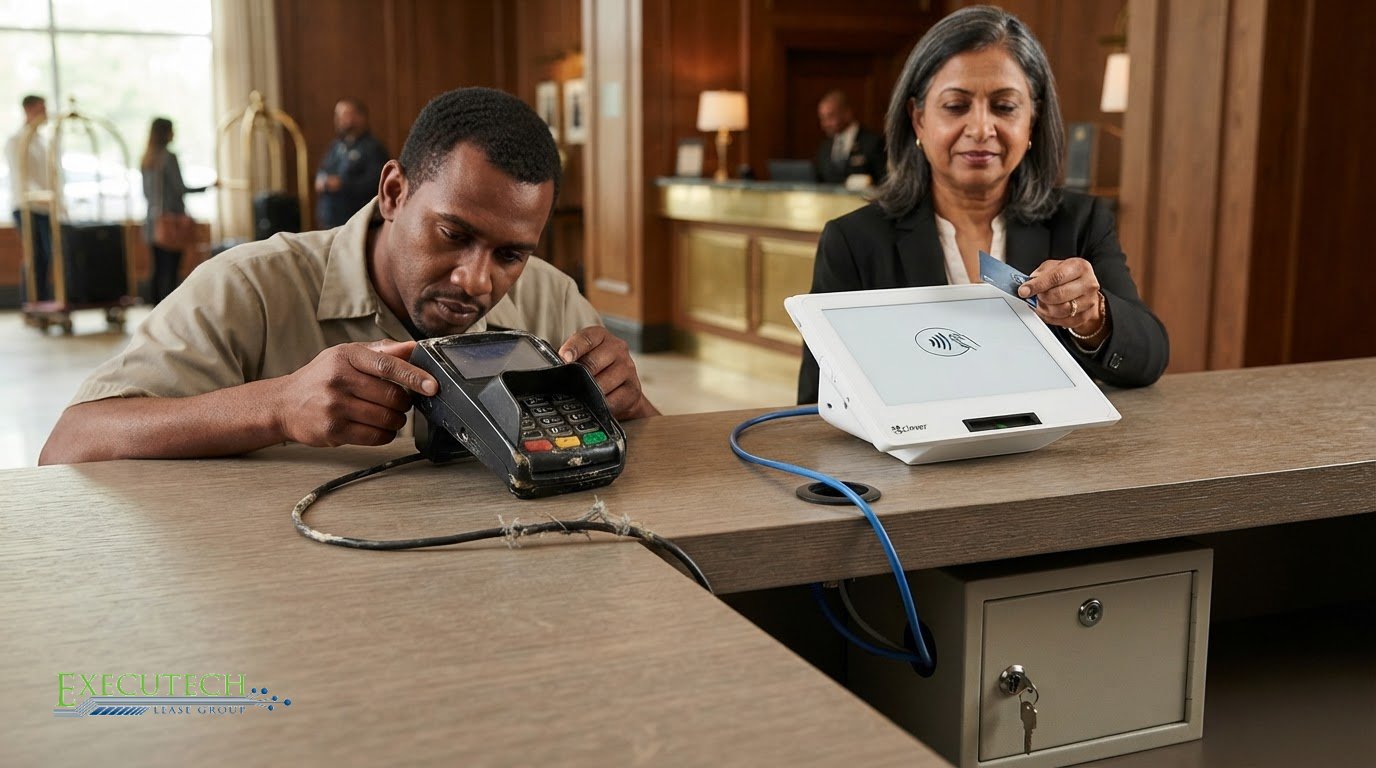
A checkout terminal can keep working while its defenses fall behind. Outdated POS system security risks include exposed payment data, malware access, and unauthorized use when older software lacks current safeguards or access controls. Encryption, updated and supported systems, PCI DSS practices, network separation, and controlled user permissions help reduce that exposure.
It’s reasonable to be concerned about a system that handles payments every day. A POS terminal is part of a wider business environment, so weak security can affect more than checkout. The first step is to identify where older systems leave gaps and which protections address them.
This article explains how POS security works, why outdated software and stored payment data can create vulnerabilities, and how encryption, security procedures, PCI DSS, and access controls help protect transactions. It also covers when an older system’s limitations may make replacement worth considering.
Key Takeaways
- Encrypt payment data during transactions, while it travels across networks, and wherever it’s stored to limit exposure if a system is compromised.
- Keep POS software, operating systems, and firmware updated, and separate payment terminals from guest Wi-Fi and general business traffic.
- Use PCI DSS as a guide for protecting payment-card data, and maintain clear records of who accesses POS terminals and servers.
- Give each employee unique credentials, enable multi-factor authentication, and limit system permissions to the access each role requires.
- If an older system can’t receive security updates, consider replacing it; equipment leasing can help spread the cost of POS and card-terminal equipment.
End-to-end encryption
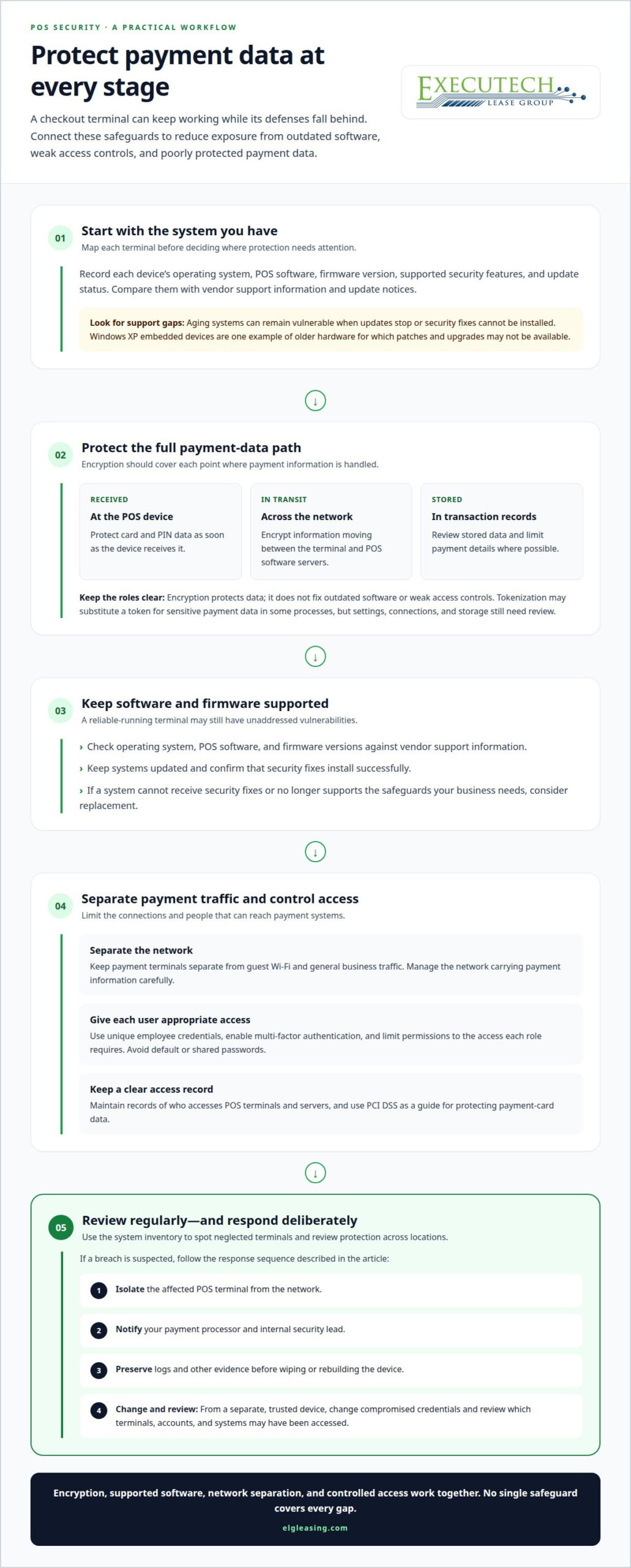
Encrypt payment data at each stage: when a POS device receives it, as it travels across a network, and wherever it is stored. Outdated POS system security risks increase when equipment can’t support current encryption or security frameworks, leaving gaps between these stages.
Encryption of Card and PIN Data
Encryption converts card and PIN data into a protected form that is harder to read without authorization. Protection should begin when the POS device receives payment information and continue while the system processes or stores it. If a terminal or connected application is compromised, encryption can reduce exposure of readable customer details. It is one safeguard, not a substitute for secure software and access controls.
Network Encryption and Security
Network encryption protects payment information as it moves between a terminal and POS software servers. For example, a checkout terminal sending transaction data across a business network needs protection during transmission, not only after the data arrives. Encryption helps reduce the chance that intercepted information can be read. It does not secure every device or connection on its own, so the network carrying payment traffic also needs careful management.
Encryption Limits and Data Protection
Encryption protects data, while a security framework organizes the wider safeguards around it. An older POS may not support current encryption or security frameworks, and encryption alone won’t fix outdated software or weak access controls. Data protection also means limiting what the system stores, keeping software current, and managing who can access payment applications. Reducing outdated POS system security risks requires these safeguards to work together.
Consider the full transaction path, not just the terminal’s encryption setting. A payment may pass from a card reader to POS software and then across a network for processing. Protection at only one point leaves other stages exposed. Review whether payment data is encrypted when received, in transit, and at rest, including in stored transaction records.
Also separate payment data from information used for other business functions. For example, a retail system may connect checkout activity with inventory tools. That connection can improve operations, but each linked application adds to the environment that needs protection. Limit stored payment details where possible, and assess which systems genuinely need access.
Modern POS solutions may combine encryption with tokenization and automatic security updates. Tokenization substitutes a token for sensitive payment data in some processes, while updates address software vulnerabilities. These features can strengthen security, but they don’t remove the need to review settings, connections, and data storage. An unsupported POS that can’t receive current safeguards may need replacement.
Keep a record of each terminal’s POS software version, supported security features, and update status. This inventory helps identify older devices that lack current protections and shows where encryption coverage needs attention. Reviewing all locations consistently also helps prevent one neglected terminal from weakening the wider payment environment.
What is the importance of implementing security procedures when operating a POS?
POS security procedures bring software, hardware, and employee practices together in a repeatable defense. Without them, a weakness in one terminal can affect payment operations across a connected network.
Outdated Software and Hardware Vulnerabilities
Aging POS systems can become vulnerable when software and firmware updates stop, leaving known weaknesses unaddressed. Older on-premise setups may rely on manual patching, and delays can leave gaps exposed. Hardware matters too: the Meltdown and Spectre flaws in chips used in POS devices could expose passwords and encryption keys, putting cardholder data at risk.
To assess your equipment, record each terminal’s operating system, POS software, and firmware versions. Compare them with the vendor’s supported versions and update notices. Windows XP embedded devices are one example of older hardware for which patches and upgrades may not be available. If a system can’t receive security fixes or no longer meets your security needs, replacement is worth considering.
POS Breaches and Cyberattacks
POS vulnerabilities can give attackers a route to payment data, transaction records, and connected business systems. Common weaknesses include default or shared passwords, poor network separation, RAM-scraper malware, and unauthorized physical access. Malware may capture payment data from memory and transmit it through a command-and-control server. Regular security procedures are therefore part of reliable retail operations.
After a suspected breach, isolate the affected POS terminal from the network, then notify your payment processor and internal security lead. Preserve logs and other evidence before wiping or rebuilding the device. Using a separate, trusted device, change compromised credentials and review which terminals, accounts, and systems may have been accessed. These steps can help contain further exposure while your incident response team investigates.
Checking and Replacing Outdated POS Systems
To determine whether a POS is outdated or unsupported, inventory each device and compare its software, firmware, and operating-system status with vendor support information. Note whether security fixes install successfully and whether the system still supports the safeguards your business needs. A terminal can run reliably and still be vulnerable if its manufacturer no longer provides updates.
Replace an outdated POS when it can’t receive necessary security updates, can’t support current safeguards, or leaves known vulnerabilities unresolved. Assess the risk to payment operations alongside the cost and disruption of continued manual maintenance. If replacement is the sensible next step, you can apply for POS equipment leasing to explore an equipment-acquisition option.
PCI DSS compliance
The Payment Card Industry Data Security Standard (PCI DSS) is a security standard for businesses that handle payment-card information. An outdated POS terminal or unsupported software can make it harder to meet its expectations, so review compliance regularly.
Businesses that accept card payments may face penalties from their bank for noncompliance. Older POS software may lack safeguards reflected in current PCI DSS expectations, and a terminal that can’t receive security updates can leave gaps in business controls.
Review the POS environment as a connected system, not just a checkout device. Include each payment terminal, server, network connection, and application that stores or processes cardholder data. For example, a store’s POS may link sales records with inventory software. Document where payment information moves, which systems can access it, and what controls protect those points.
Use a practical review to identify common compliance concerns:
- Confirm the POS software and device firmware receive security updates.
- Check that default passwords have been replaced and access is restricted by employee role.
- Record employees, vendors, and third parties who access terminals or POS servers.
- Review whether payment systems share a network with guest Wi-Fi or general business traffic.
- Keep records of security procedures, system changes, and completed reviews.
These checks connect PCI DSS expectations to daily operations. A record of vendor access, for example, helps show who could reach a POS server and when. Separating payment terminals from guest Wi-Fi reduces unnecessary connections. Updated passwords and access permissions limit exposure if an account is compromised. Each control addresses a different part of the payment environment.
Payment security expectations evolve, so a review based on an older software version may not reflect current requirements. Track the PCI DSS version used in your assessment and review changes when updating POS software or adding terminals. An upgrade involves more than installing software: confirm that the terminal, connected systems, and documented procedures still align with the security controls you rely on.
Other requirements may apply depending on the business, the data it handles, and its operations. Don’t assume that meeting one framework automatically satisfies another. For a retailer, the immediate task is to map payment data, identify relevant controls, and document evidence that they are in place. If outdated hardware prevents required safeguards, include replacement in the compliance plan. Regular reviews can reveal gaps before an audit, bank review, or security incident does.
Payment card data stored on magnetic-stripe tracks
Legacy POS systems can expose payment-card data when malware reads information held briefly in system memory during authorization. Most U.S. payment cards contain two tracks used by financial institutions to store customer information, giving attackers a target beyond the physical stripe itself.
Track 1 stores 79 alphanumeric characters, while Track 2 stores 40 numeric characters. POS malware can target data from as many as three magnetic-stripe tracks. Most U.S. cards use two; Track 3 isn’t standardized among banks and is rarely used. These details help explain why older payment environments need careful cybersecurity controls.
During authorization and processing, data from Tracks 1 and 2 may sit briefly unencrypted in a POS system’s RAM. A RAM scraper can scan memory for card data, using patterns such as regular expressions or the Luhn Algorithm to identify likely payment information. Malware can then send extracted records to attackers through a command-and-control server.
How do legacy POS systems expose payment-card data to hackers? Malware can enter through vulnerable software, weak access controls, or connected systems, then search POS memory while transactions are processed. Attackers may extract readable card data and send it beyond the business network.
Ransomware can cause a separate operational crisis by disrupting access to POS systems and business data. Malware targeting payment information may instead capture customer data without interrupting checkout. Both types of attack can threaten sales operations, customer trust, and the ability to investigate what happened. A breach can also cause financial and reputational damage, especially when the business can’t quickly determine which systems or records were affected.
Reduce the sensitive information available to an attacker. Review what the POS environment stores, limit cardholder-data retention where possible, and monitor system activity for unexpected access. Keep software and firmware updated, since unsupported components can leave known weaknesses open. Check POS systems and card-swipe equipment regularly for unfamiliar connected devices, including attachments that don’t belong at checkout.
- Inventory terminals, card readers, and connected devices across each location.
- Restrict access to POS systems and review employee and vendor accounts.
- Monitor logs for unusual access, data movement, or changes to payment applications.
- Preserve relevant system records if a suspected breach requires investigation.
A quick response matters. Isolate a suspected compromised terminal from the network, preserve its logs, and identify affected systems before restoring operations. Assess whether payment data may have been accessed, then document the incident and response. A clear record helps the business understand its exposure and address the weakness that allowed the attack.
Multi-factor authentication and access controls
A POS account needs more than a password. Unique employee credentials, multi-factor authentication, and role-based permissions make unauthorized access more difficult and can help contain threats.
Give each employee a separate login instead of sharing a register account. When several employees use the same credentials, it becomes harder to trace a transaction or settings change. Assign role-based permissions so cashiers can process sales without administrative access to software settings or user accounts. Remove access when an employee’s role changes or ends.
Add multi-factor authentication (MFA) to POS accounts and remote access where the system supports it. MFA requires another verification step beyond a password, reducing the value of a stolen password alone. Use unique credentials for each account, lock accounts after multiple failed login attempts, and change POS passwords at least once every 90 days. These controls create clear barriers without relying on one safeguard.
- Give each employee an individual POS login; avoid shared credentials.
- Limit permissions to the functions each role needs.
- Enable MFA for POS accounts and vendor remote access when possible.
- Lock accounts after repeated failed login attempts.
- Review access when employees change roles or leave.
Remote access needs its own controls. A vendor connection can provide a route into POS systems, so require MFA for vendor access when possible and keep a record of connections. Limit remote accounts to the systems and functions needed for the work, and disable access when it is no longer required. A clear access record helps identify activity tied to an account if an incident occurs.
Physical access matters too. Keep POS terminals in staffed checkout areas, and restrict access to device ports. Disable USB ports unless they connect to an authorized device. This reduces opportunities to attach unapproved hardware or load files directly onto a terminal. Employees should report unfamiliar devices connected to a register rather than unplugging or investigating them without following store procedures.
Restrict the online destinations each POS terminal can reach. Allow connections needed for payment functions, such as payment gateways, and block unrelated destinations. Keep terminals off guest Wi-Fi, and don’t use POS devices for email, social media, or general browsing. Separating payment traffic from mobile devices and guest connections reduces exposure to unrelated activity and unnecessary links with other systems.
Access procedures work best when employees understand their role. Train staff to protect credentials, report unexpected login prompts, and avoid leaving an active register unattended. Review account permissions and connection logs regularly. These controls make POS access easier to trace and help reduce the risk that one compromised account spreads threats across business operations.
Executech Lease Group (ELG Leasing): 12-60 Month Credit Card and POS Equipment Leases
Executech Lease Group (ELG Leasing) offers a practical equipment-acquisition path when an unsupported POS system needs replacement. Leasing can help you plan for updated payment technology without treating the purchase as an immediate equipment outlay.
ELG leases POS and card terminal equipment through 12-60 month terms, with Lease-to-Own Programs and FMV Lease Options. These options address equipment acquisition, not cybersecurity management. Your business still needs to assess software support, encryption, access controls, and PCI DSS practices for its chosen system.
If replacing an aging POS is your next step, explore ELG’s Leasing Programs to compare equipment lease structures.
Turn Your POS Security Review Into a Clear Next Step
Make your POS review part of routine business planning. Assign someone to track system support, document security decisions, and revisit the plan when payment operations change. Treating outdated POS system security risks as an operational issue helps you weigh security needs alongside checkout continuity and your team’s requirements.
If replacement is the right direction, define what the business needs from its next POS system before deciding. Consider how it fits your payment workflow, staff access, and future operating plans. A clear requirements list can make the transition more structured and keep security in view.
Take the next step at a pace that fits your business. Explore ELG’s equipment leasing options and decide how to move forward with a clear plan.
Consistent reviews and deliberate decisions can help build a more resilient checkout operation.
This article reflects the author’s opinion for general information only and isn’t tax, legal, or accounting advice. Consult your CPA or attorney about your specific situation.
Frequently Asked Questions
What Is POS Security?
POS security protects checkout devices, payment workflows, and connected business information from unauthorized access or disruption. It covers more than card-data encryption: it also includes who can change settings, which systems communicate with a terminal, and how the business maintains transaction records. For example, a retailer should consider both the register and any back-office computer that can access sales reports as part of one security environment.
How Are Points-of-Sale Infected?
Attackers can infect POS environments through malicious email attachments, compromised accounts, unapproved devices, or exposed remote connections. A phishing message opened on a computer connected to the payment network can create a path toward checkout systems. An attacker may also misuse vendor credentials. The entry route can be indirect, so businesses should account for office computers and third-party access, not just the register.
POS system safety in the future?
POS security depends on ongoing maintenance, clear vendor support, and the ability to respond as threats change. When evaluating a system, consider how security fixes are delivered, how administrators can see device status, and how the business can limit access if a terminal is compromised. Plan periodic reviews rather than treating security as a one-time setup. A modern interface alone does not establish security.
What Can Retailers Do to Prevent POS Intrusions?
Retailers can reduce intrusion opportunities by controlling changes and practicing their response. Assign someone to review system changes, require a second employee to approve payment-application updates, and test vendor patches after installation. Record who approved each change. A brief incident exercise can also help employees know how to report a suspicious register and who should isolate it from business systems.
What Data Does POS Malware Steal?
POS malware may target payment-card information, but attackers can also seek login credentials or transaction details available through connected systems. The information exposed depends on the terminal’s software, what it stores, and which systems a compromised account can reach. For example, a register linked to sales reporting may expose more than payment data. Limit stored information and review which applications can access it.
What Other Hazards Does Outdated Equipment Pose To My Business?
Outdated equipment can hinder operations even without a cyberattack. A legacy terminal may not support mobile-wallet or contactless payments, which can frustrate customers who expect those checkout options. Limited inventory tracking can also make stock levels harder to manage. A slow or unreliable checkout can disrupt service during busy periods. Assess these operating constraints alongside security when deciding whether equipment still fits your business.
What can happen to outdated retail POS systems?
An outdated retail POS may become harder to maintain as its software or hardware loses support. Security fixes may no longer be available, and a system failure can disrupt checkout until the business restores its local setup. In on-premise environments, each store or terminal may need individual restoration after an incident. This can complicate recovery across multiple locations and make consistent operations harder to maintain.
What is a POS attack?
A POS attack is an attempt to access, disrupt, or misuse a point-of-sale system or its connected environment. For example, an attacker could use stolen credentials to enter a POS account, install malicious software, or extract information from a connected device. The target may be payment data, business records, or system availability. Identifying the entry point helps the business contain access and investigate affected systems.
This article reflects the author’s opinion for general information only and isn’t tax, legal, or accounting advice. Consult your CPA or attorney about your specific situation.

Article by
Robert Ensminger
Robert Ensminger is the founder and CEO of Executech Lease Group (ELG Leasing), which specializes in equipment leasing and financing solutions for the merchant-services, payments, POS, and FinTech industries. With more than 20 years of industry experience, Robert helps ISOs, payment processors, POS providers, and software companies build practical equipment leasing programs. He founded ELG in 2010. His work focuses on responsive service, transparent program structures, subscription and SaaS-monetization programs, and helping ELG’s partners close more business while creating sustainable revenue.