A lease buyout makes sense only when its total cost compares favorably with the value of keeping the equipment. A POS system lease buyout calculator can help you compare the buyout amount and related costs with expected savings over the same period. The monthly payment alone won’t show whether the choice works for your business.
Before deciding, gather the lease payoff terms, remaining payments, purchase option, and any applicable fees. Leave out one of these details and the comparison may give a misleading impression of the total cost.
This guide explains how to find the relevant lease details, estimate the buyout cost, and compare it with expected savings. It also covers how to account for fees and assess end-of-term choices, such as buying the equipment, returning it, or continuing the lease when the agreement allows. The aim is a practical comparison based on your actual options, not just an appealing monthly figure.
Key Takeaways
- Gather your monthly payment, remaining term, and buyout terms before estimating the total cost.
- Compare the buyout with expected processor savings over the same period to judge whether it makes financial sense.
- Include applicable taxes and contract fees so your estimate reflects more than the quoted buyout amount.
- Review whether your lease allows you to return the equipment, purchase it, or extend the arrangement at the end of the term.
- Understand how lease-to-own and fair market value options affect your end-of-term decision.
Finding lease payment and remaining term details
State requirements may differ, so review your agreement and applicable rules. Calculate the amount using the contract’s buyout method, then compare it with your remaining obligations. Consider whether the cost exceeds the equipment’s value to your business and what ownership transfer means under the agreement.
Determine the Remaining Lease Term
Count the installments left from the next scheduled payment through the lease end date. Commercial POS leases commonly have original terms of 36 or 48 months, while equipment lease terms usually last 24-60 months. Use the dates and payment schedule in your signed agreement. Account for any amendments or payment changes so your estimate reflects the current schedule, not an outdated statement.
Calculate Remaining Payments and Buyout Cost
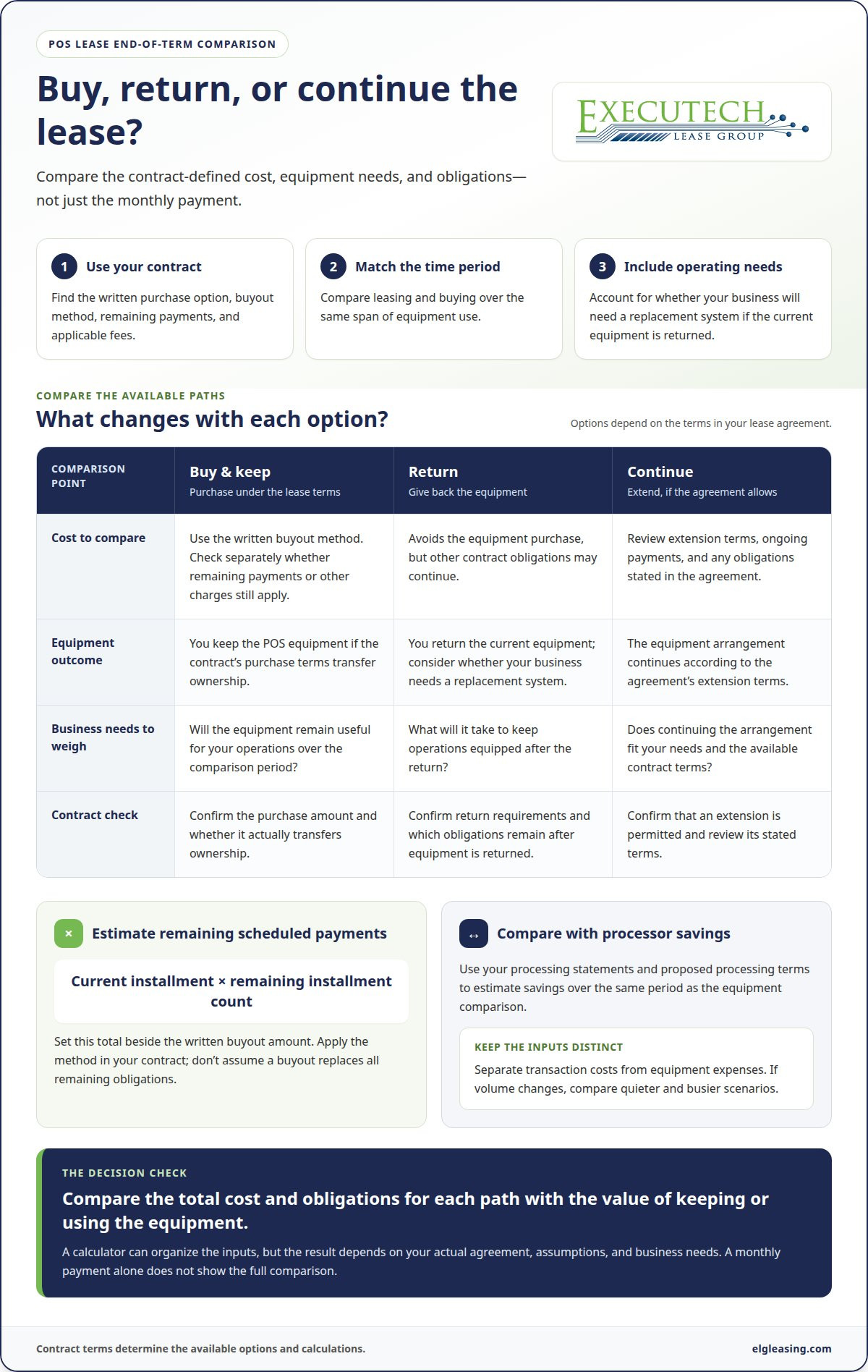
List the remaining installments separately from the written buyout amount. To calculate the scheduled payment total, multiply the current installment by the number of payments remaining, then compare that total with the contract’s buyout method. Don’t assume a buyout replaces all remaining obligations. The agreement determines whether other payments or charges still apply.
- Gather the records. Use the signed lease, latest billing statement, and any amendments. Record the payment amount, due frequency, next due date, and scheduled end date. Keeping these details together helps prevent a processor charge or unrelated account item from being counted as equipment lease payments.
- Map the remaining schedule. Count each installment due before the stated end date. Check whether the agreement includes an extension or a final purchase option. If an amendment changed the payment schedule, use its effective terms rather than simply subtracting elapsed months from the original term.
- Compare the two amounts. Multiply the regular payment by the remaining installment count, then set that total beside the written buyout figure. Apply the contract’s stated calculation method. A fair comparison separates a purchase amount from payments that remain due, instead of adding or subtracting amounts without checking how the agreement treats them.
- Assess the ownership risk. Consider whether the equipment will remain useful for your operations and whether the buyout actually transfers ownership under the agreement. A calculation can miss obligations or charges if it uses only the monthly payment. Include the purchase terms and your intended use before treating the estimate as the full cost.
For a qualifying equipment purchase, Section 179 and bonus depreciation may allow a business to deduct a large share in the year it is placed in service, according to the Internal Revenue Service.
Comparing buyout cost with processor savings
Compare the buyout cost with expected savings over the same period. This helps you assess the equipment decision alongside your payment-processing arrangement.
- Estimate savings using your own processing records. Review statements that reflect your usual transaction volume, then compare them with the proposed processing terms. Separate transaction costs from equipment expenses. If volume changes, build distinct scenarios for quieter and busier periods rather than relying on one optimistic estimate. This helps show how sensitive projected savings are to actual business activity.
- Compare buying with returning the equipment. A buyout means you keep the POS equipment under the contract’s purchase terms. Returning it avoids that purchase, but your business may still need a replacement system. Compare the obligations that continue under each path, then account for the operational impact of not having the current equipment. This provides a more useful comparison than focusing only on the buyout amount.
- Use a consistent period for each option. Compare leasing and buying over the same span of use. Include the costs relevant to each path, such as payments, purchase charges, and the equipment’s estimated value at the end. Don’t compare a short lease period with a longer ownership period. A calculator can organize these inputs, but the result depends on the assumptions and contract terms entered.
- Identify the buyout method before calculating. The lease agreement defines how a purchase amount is determined. Some methods use fair market value alongside remaining payments; other contract structures use different terms. A method may also require a merchant to pay the remaining balance and return the equipment. Don’t apply a formula from another lease. Use the method written for your contract.
- Distinguish a buyout from early termination. A buyout concerns purchasing or retaining equipment under the lease’s purchase terms. An early termination payoff addresses ending obligations before the scheduled term and may use a different contract calculation. It doesn’t necessarily transfer ownership. Review the two options separately before deciding. If a new POS equipment lease is part of your plans, you can apply for POS equipment leasing as a separate next step.
Use the comparison to understand how each option affects equipment use, ownership, and processing costs. Keep your assumptions visible so you can update them if transaction volume or business needs change.
Entering lease terms and buyout details
Enter the contract’s actual terms before relying on a calculator estimate. An accurate result depends on matching each input to the agreement, including the lease structure and purchase option.
- Enter the original term and effective date. Use the signed agreement to identify when the lease began and its scheduled duration. Commercial POS leases commonly have original terms of 36 or 48 months, while equipment lease terms usually last 24-60 months. If an amendment changed the term, use the amended schedule. Don’t estimate the end date from memory, since that can distort the remaining term shown by the calculator.
- Use the payment currently due under the agreement. Enter the equipment installment, payment frequency, and any scheduled change that applies. Keep processing charges and unrelated account items separate. If the lease payment changed through an amendment, use the current amount for future installments, not an earlier payment from the billing history.
- Choose the right purchase option. Find the contract language for a fixed purchase amount, residual value, fair market value, or return requirement. The calculator must reflect the option your agreement actually provides. Don’t treat fair market value and residual value as interchangeable unless the contract says they use the same basis. A wrong selection can produce an estimate that looks precise but does not match your lease.
- Keep early termination separate. A buyout option and an early termination payoff describe different contract situations. Enter a purchase amount only when the contract terms concern acquiring the equipment. If your question is about ending the lease before its scheduled term, keep that payoff distinct. Mixing the two can misstate both the cost and the ownership outcome.
- Model financing only when it applies. If you expect to finance the purchase, enter the amount financed, the lender’s quoted interest rate, and the repayment term. Calculator options may include 12, 24, 36, 48, or 60 months. Compare the total repayment with the cash purchase amount. A longer term can reduce the installment while increasing the time you carry the obligation, so don’t compare monthly amounts alone.
- Review each input against the document. Match dates, payment terms, purchase language, and amendments before using the result. Separate contractual figures from financing assumptions. If a calculator asks for a field your agreement doesn’t use, don’t substitute a guessed value. The lease structure determines which inputs belong in the estimate and how they affect the result.
Keep the agreement with your calculator inputs. This record helps distinguish figures drawn from the contract from those based on a financing scenario.
Additional buyout costs and fees
Show each charge in the payoff quote on its own line. This keeps the equipment buyout separate from residual values, taxes, and other contract obligations.
- Separate the quoted buyout from additional charges. Record the equipment amount and each listed fee as separate entries. Then total them to estimate the cash required to complete the purchase. Don’t assume a quote’s headline figure includes every charge; compare the itemized amount with the agreement’s fee language.
- Account for sales tax where applicable. That illustrates how tax can increase the amount due beyond the quoted equipment value. Enter the applicable amount as a separate line, rather than blending it into the residual or the principal used for financing.
- Check how the residual value is used. A residual may form part of the purchase calculation, but its role depends on the lease structure. Don’t add it twice if the written buyout quote already includes it. Compare the residual stated in the agreement with the amount requested, and note whether the lessor uses a fixed purchase option or another valuation method.
- Include financing charges only when relevant. If you finance the buyout, interest affects the total paid over the loan term. Keep the principal, interest, and any separately listed charges distinct. That shows whether a lower monthly payment comes from a longer repayment period, rather than a lower total cost.
- Keep equipment charges separate from processing costs. Credit-processing fees belong in a different calculation from equipment leases. A processor statement may contain transaction-related costs, while a lease payoff concerns equipment and its contract terms. Combining both can hide which expense the buyout changes and which continues under a separate agreement.
- Use equipment-specific values, not vehicle assumptions. A vehicle lease calculator may use different fields and valuation assumptions. Don’t transfer its residual formula or fee categories to POS equipment without support from your agreement. Use the lessor’s itemized buyout figures, equipment description, and applicable charges instead.
- Reconcile the final total before comparing options. Add the buyout, applicable taxes, contract charges, and financing cost without duplicating any included amount. Keep the written quote beside your calculation. If two values differ, identify whether one includes tax, a residual, or another charge before using either figure in a decision.
A useful estimate lists the equipment amount and each additional cost separately. This makes fees easier to identify without confusing them with processing charges or the lease’s monthly payment.
End-of-lease return, purchase, or extension
At the scheduled end date, the lease agreement determines whether you return the POS equipment, buy it, or continue leasing. Compare each option by looking at remaining payments, the ownership outcome, and the equipment your business will need next.
- Read the end-of-term options in the agreement. Identify the deadline and required notice for each choice. A fair market value (FMV) lease may allow you to return the equipment, renew the lease, or purchase it for its market value when the term ends. Treat those as separate outcomes, since renewal continues payments while purchase changes who owns the equipment.
- Estimate the purchase option amount. Under an FMV option, the buyout is about 10% of the original equipment cost. Use that amount as an estimate, then compare it with the lessor’s written end-of-term figure and your agreement’s terms. A $1 buyout lease instead transfers ownership for $1 at the end of the lease term. Don’t apply one option’s calculation to another contract type.
- Price the return and replacement path. Returning equipment may avoid a purchase, but it doesn’t automatically remove obligations that remain under the agreement. Include any lease payments due through the scheduled end date. If your business still needs POS equipment, include the cost of obtaining replacement equipment in the same comparison period. This reveals the full cost of returning equipment rather than focusing only on avoiding a buyout.
- Compare renewal with purchase. Add the lease payments for the renewal period and compare that total with the purchase amount. A renewal can preserve access to the current system without an immediate purchase, while buying may make sense if you plan to keep using that equipment. Include the equipment’s condition and expected usefulness in your decision, not only its estimated market value.
- Check the final figures before choosing. Put the return, purchase, and extension totals side by side. Include charges specified in the agreement and distinguish future lease payments from a buyout amount. For example, a $1 purchase option means ownership transfers for that amount at term end, but it doesn’t make earlier lease payments disappear. Use the selected option’s actual terms when deciding.
Choose the end-of-term path that fits your equipment plan and payment obligations. For a new POS equipment lease, apply for POS equipment leasing.
Executech Lease Group (ELG Leasing): Point of Sale system leasing
Executech Lease Group (ELG Leasing) provides Point of Sale system leasing for businesses planning equipment acquisition or reviewing future lease options. Its 12-60 Month Credit Card and POS Equipment Leases give merchants a defined term to consider alongside their equipment needs and budget.
Choose a lease structure that fits your end-of-term plans. Lease-to-Own Programs are intended for businesses planning to acquire the equipment through the lease arrangement. FMV Lease Options are for businesses considering a purchase, return, or lease continuation at the end of the term. Compare the contract terms and projected total cost, particularly if you’re weighing a current buyout against leasing POS equipment under a new agreement.
If you’re exploring POS equipment leasing for your business, contact Executech Lease Group (ELG) to discuss your needs.
Make Your Next POS Decision With Clarity
Use the buyout calculation to make a deliberate decision about the role POS equipment should play in your business. A POS system lease buyout calculator can organize the numbers, but your decision should also reflect how long you expect to use the system and how well it fits your operations.
Before committing, decide what matters most: keeping the equipment, retaining flexibility at the end of the term, or planning for a different POS setup. That priority gives your cost comparison a practical purpose. Choose the option that fits your plans, rather than focusing on a single payment figure.
When you’re ready, explore equipment leasing options with ELG.
Move forward with a clear view of your priorities and the option that supports your business.
This article reflects the author’s opinion for general information only and isn’t tax, legal, or accounting advice. Consult your CPA or attorney about your specific situation.
Frequently Asked Questions
Is a Buyout Worth It?
A buyout can make sense if keeping the POS equipment supports your operations and its total cost compares favorably with your alternatives. For example, weigh the purchase amount against continuing lease payments, replacement equipment, and expected processor savings over the same period. Ownership alone doesn’t establish value. Consider whether the system still meets your needs and whether you’d use it long enough to justify the added cost.
Is the Buyout Offer You Received Actually a Good Deal?
Assess the offer using its itemized total, not just the quoted equipment amount. Compare that total with remaining lease obligations, replacement costs, and the value of keeping the POS system. Use the same time period for each option, and count related charges only once. Consider whether the equipment will remain useful to your business. Even a low buyout may be poor value if you won’t use the system.
What is a fair market value lease versus a $1 buyout lease?
An FMV lease gives you an end-of-term choice tied to the equipment’s fair market value, such as purchasing, returning, or continuing the lease when the agreement allows. A $1 buyout lease transfers ownership for $1 at the end of the lease term. The payment structure and end-of-term choice differ, so compare the full lease obligations and intended ownership outcome before selecting an arrangement.
What information is needed to calculate a POS equipment lease buyout?
A POS system lease buyout calculator needs the current payment, payment schedule, remaining term, and buyout method stated in your agreement. Gather any written payoff quote and listed fees, too. Keep processing charges separate from equipment obligations. If you plan to finance the purchase, include the proposed principal, interest rate, and repayment term so the estimate reflects financing costs, not just the cash buyout.
How do residual value and fair market value affect a POS lease buyout?
Residual value is a contract figure that may affect the purchase option or end-of-term amount. Fair market value is a valuation basis used in some lease arrangements. The two aren’t automatically interchangeable: the agreement determines how each applies. For example, if the purchase option is based on fair market value, don’t substitute a stated residual unless the contract’s calculation uses it.
What fees and taxes may be included in a POS lease buyout?
A payoff total may include charges specified in the agreement and applicable taxes. The items that apply depend on the contract and transaction. List the equipment purchase amount, taxes, and each stated fee separately in your estimate. This can help reveal duplicate charges, such as a residual already included in the quoted buyout. Tax treatment and accounting depend on your circumstances, so consult your CPA.
How does a POS lease buyout compare with returning or upgrading the equipment?
Buying lets you keep the equipment; returning it means following the agreement’s end-of-term requirements. If you need a different system, compare the return option with the cost of getting replacement equipment through a new arrangement. Include any payments or charges still owed under the current agreement. Replacing equipment at the end of the term may suit changing business needs, but compare total obligations instead of assuming a new system will cost less.
Where can I find the buyout price and purchase option in a POS lease agreement?
Search the agreement for terms such as “purchase option,” “buyout,” “residual value,” and “fair market value.” Review the sections on the lease term and end-of-term choices, along with any amendments to those terms. A separate payoff quote may state the amount due on a particular date. Compare it with the contract language to understand which charges and obligations it covers.
This article reflects the author’s opinion for general information only and isn’t tax, legal, or accounting advice. Consult your CPA or attorney about your specific situation.

Article by
Robert Ensminger
Robert Ensminger is the founder and CEO of Executech Lease Group (ELG Leasing), which specializes in equipment leasing and financing solutions for the merchant-services, payments, POS, and FinTech industries. With more than 20 years of industry experience, Robert helps ISOs, payment processors, POS providers, and software companies build practical equipment leasing programs. He founded ELG in 2010. His work focuses on responsive service, transparent program structures, subscription and SaaS-monetization programs, and helping ELG’s partners close more business while creating sustainable revenue.