What happens if my leased credit card terminal breaks, and who should you call first? A failed transaction doesn’t automatically tell you whether the terminal, your internet connection, or your payment processor caused the problem. A device failure also doesn’t, by itself, tell you what your lease requires.
Start by documenting the error, checking the power and connections, and restarting the terminal only if the manufacturer’s instructions say it’s safe. Then contact the party responsible for the issue: the equipment manufacturer for hardware and warranty questions, your internet provider for a connection problem, or your payment processor for processing errors.
In this guide, you’ll learn what to do first, how to keep equipment, processing, and lease questions separate, and what to review before deciding on next steps. Executech Lease Group (ELG) brokers equipment leases. ELG doesn’t provide repairs, replacements, warranties, or payment processing. A lease and a manufacturer warranty serve different purposes, so don’t assume a broken terminal changes your lease terms. Review your agreement before acting.
Key Takeaways
- Record when the terminal failed, what it was doing, any error messages, and the troubleshooting steps you tried.
- Use power, screen, network, and transaction symptoms as clues to narrow down the issue, not as proof of its cause.
- For what happens if my leased credit card terminal breaks, keep warranty, processing, and lease questions separate and direct each to the responsible party.
- Check the equipment manufacturer’s warranty information and review your lease agreement before making decisions about your obligations.
- Keep troubleshooting records separate from any later decision about acquiring another terminal or choosing a lease structure.
My leased credit card terminal broke: what should I do first?
Pause before trying to fix it. Note what failed and identify which function is affected. Does the terminal stay dark, turn on but fail to connect, or accept input without completing a transaction? These symptoms point to different parts of your payment setup, but they don’t confirm the cause.
Keep the first checks simple and safe. Follow the manufacturer’s instructions, and don’t repeat steps those instructions warn against. Avoid opening the device or attempting repairs. A malfunction doesn’t determine warranty coverage or establish what your lease requires. Gather the facts and address those questions separately.
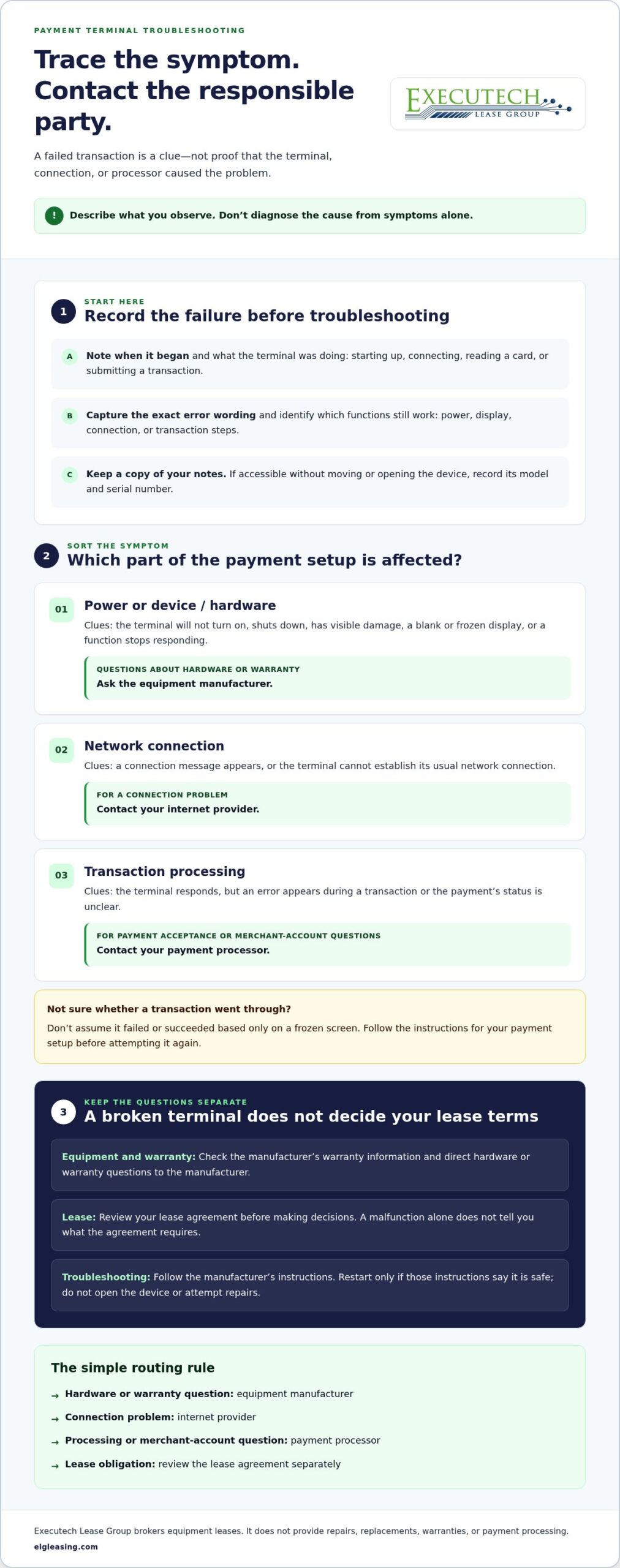
- Record when the failure began and what the terminal was doing.
- Identify whether power, the display, connectivity, or a transaction step is affected.
- Preserve error messages and note any checks you’ve already completed.
Record the terminal failure before troubleshooting
Write down when the problem began and what the terminal was doing at the time. Note whether it was idle, starting up, connecting, reading a card, or attempting to submit a transaction. Capture the exact wording of any error message and which functions you can still access. Describe what you observed; don’t label it a hardware defect or processing outage without evidence.
If you can access them without moving or opening the device, record its model and serial number. These identifiers can help identify the terminal when you discuss a manufacturer warranty. Keep a copy of your notes and update them if the symptoms change.
Protect payment operations while the device is unavailable
Establish what your business can and can’t do right now. Note whether the terminal powers on, connects, and reaches the transaction step where the interruption occurs. Don’t assume a transaction failed or succeeded based only on a frozen screen. Follow the instructions for your payment setup before attempting it again.
If another payment method or device is already available through your merchant arrangements, use it only according to those arrangements and its instructions. Don’t assume it will work with your account. Record which options remain available and which payment steps are disrupted. This gives you an operational picture without guessing at the fault.
Once you’ve documented the symptoms and their effect on payments, you’ll have a clearer starting point for identifying the next step. A device malfunction alone doesn’t answer what your lease requires, so review the agreement separately before making decisions about it.
How to tell whether the terminal, connection, or processing is failing
A failed transaction doesn’t automatically mean the terminal is broken. Sort what you observe into four categories: power, screen or hardware, network connection, and transaction processing. Treat each category as a clue, not a diagnosis. Symptoms can overlap, so record what the device actually does before deciding where the fault lies.
For what happens if my leased credit card terminal breaks, the next step depends on the type of issue. Direct device and manufacturer-warranty questions to the equipment manufacturer. Send payment acceptance and merchant-account questions to your payment processor. Keep both separate from questions about your equipment lease.
- Power: The terminal won’t turn on or shuts down during use.
- Screen or hardware: The display is blank, frozen, visibly damaged, or one function stops responding.
- Network: A connection message appears, or the terminal can’t establish its usual network connection.
- Transaction processing: The terminal responds, but an error appears during a transaction or the transaction’s status is unclear.
Symptoms that point toward a device or power issue
A terminal that won’t power on, has visible physical damage, or shows an unresponsive screen may indicate a device or power concern. Note whether the whole unit is affected or just one function, such as the display or card reader. If the screen works but a transaction fails, record that difference. It helps describe the equipment symptom separately from the payment-flow issue without assuming the cause.
Don’t open the terminal or attempt a repair based on a guess. Follow the manufacturer’s instructions, and direct hardware or warranty questions to the manufacturer.
Symptoms that may involve connectivity or payment processing
Note when the problem appears. Does a network message show before you begin, or does an error appear only after entering payment details? Record whether the terminal remains responsive, whether the issue occurs at a particular transaction step, and whether the status of an attempted payment is clear. These details may help narrow the question, but they don’t prove that the network or processing account caused the problem.
Direct payment-acceptance or merchant-account questions to your processor. Include the error wording and the point in the transaction where it appeared. Keep those discussions distinct from lease questions; a processing issue doesn’t explain your equipment agreement.
Use the symptom categories to describe the problem, not to assign responsibility. A clear, factual description gives the relevant party a better starting point for assessing the issue.
What a broken terminal means for its warranty and lease
A malfunction raises three separate questions: who handles the physical equipment, who handles payment acceptance, and what the lease agreement requires. Those responsibilities don’t automatically move to the same party because the terminal has stopped working. To understand what happens if my leased credit card terminal breaks, identify which issue you’re addressing, then check the applicable warranty information or signed agreement.
Equipment warranty or repair: Any warranty coverage comes from the equipment manufacturer. Direct device and warranty questions to the manufacturer. ELG doesn’t provide warranty coverage, maintenance, repairs, or replacements.
Payment processing: Your merchant payment processor handles questions about payment acceptance and your processing account. ELG doesn’t process payments or control the processor’s obligations.
Equipment lease: The signed lease governs your specific obligations and any procedures it describes. Review it rather than assuming the equipment failure changes the agreement.
Who handles the equipment warranty or repair question?
Start with the manufacturer for questions about the terminal’s hardware, warranty coverage, and repair process. Have the model and serial number available if you can access them, along with a description of the symptoms. The manufacturer can explain whether coverage applies and what steps it requires. A lease is not a source of repair or replacement coverage.
ELG’s role is equipment lease brokerage. It doesn’t provide equipment warranties, maintenance, repairs, or replacements. Keep the manufacturer’s response and any related records with your device documentation so you can distinguish the equipment issue from questions about your lease.
Does a malfunction change the lease agreement?
A broken terminal alone doesn’t establish that a lease has ended, paused, or changed. Don’t assume a malfunction automatically alters your obligations, or infer a cancellation right or remedy from the failure itself. The signed agreement is the source for the terms that apply to your arrangement.
Review the document for the parties named, the equipment covered, payment obligations, and any notice or communication procedures it describes. Follow the wording in your own agreement; don’t rely on a general description of another merchant’s lease. If a clause is unclear, consider getting qualified advice before acting on an interpretation.
Keep the three conversations distinct: the manufacturer for equipment and warranty, the processor for payment acceptance, and the lease agreement for your contractual terms. Record what each party says and when. This helps you address the device problem without treating it as an answer to a separate lease question.
What to document and communicate about a broken leased terminal
A clear record keeps three separate conversations from becoming one confusing thread: the equipment issue, payment processing, and the lease. Knowing what happens if my leased credit card terminal breaks includes knowing what information to preserve and which party needs it. Keep notes factual. Write down what you observed, what you tried, and what each contact told you, without guessing at a cause or assuming the malfunction changes your agreement.
Build a concise incident record
Create a dated timeline and update it when symptoms change. Capture the details that help someone understand what happened without estimating unverified financial losses or drawing conclusions for them.
- Timeline: Record when the issue began and the date and time of later changes or contacts.
- Symptoms: Describe what the terminal did, the function affected, and the exact error message, if one appeared.
- Device details: Note the model and serial number if accessible, plus any visible damage.
- Actions taken: List the checks you performed and whether anything changed afterward.
- Business impact: Record which payment functions or transaction steps were unavailable, without assigning a dollar value unless you have verified records.
Save relevant messages, service responses, and documents with the timeline. For each contact, note the date, the person or department you spoke with, and any next step they described. If you receive instructions, preserve the wording rather than relying on memory. This makes it easier to explain the sequence consistently if you need to follow up.
Keep conversations focused on the right issue
Keep separate records for the manufacturer, payment processor, and lease. Ask each party about the subject within its role. That way, an equipment response won’t be mistaken for a processing decision, or either one for a change to lease terms.
- Manufacturer: Ask about device warranty coverage, equipment symptoms, and the manufacturer’s repair procedures.
- Payment processor: Ask about transaction acceptance, payment-account activity, or processing errors.
- Lease: Compare any question about your obligations or required communication with the signed agreement.
Keep the lease record especially precise. Save the relevant agreement and identify the clause or procedure you’re asking about. Don’t stop payments, change payment arrangements, or assume a remedy based only on the terminal failure. Review the signed terms before taking action, and seek qualified advice if you can’t interpret a provision. An organized record helps you ask a specific question without treating one party as responsible for all three issues.
For vendor, ISO, or merchant-services provider inquiries, use the Become a Vendor inquiry form. It is a contact form, not a merchant financing application or repair request.
Plan your next credit card terminal decision without confusing it with the repair
Address the immediate device issue before treating it as a reason to acquire different equipment. A repair or warranty inquiry concerns the terminal you have now. A future equipment decision is separate and deserves its own review, based on your business needs and the terms you’re considering. Keeping those decisions apart helps you avoid assuming a malfunction calls for a new lease or changes your existing agreement.
If you’re asking what happens if my leased credit card terminal breaks, the answer doesn’t determine what equipment you should use next. First establish what the manufacturer says about the current device and what your signed agreement requires. Then assess whether another terminal is needed and how it would fit your payment setup.
Questions to consider before arranging different equipment
Start with the operating need, not a particular device or financing structure. Identify the payment functions your business relies on, how the terminal is intended to be used, and what must work with your existing payment arrangements. Don’t assume a different device will be compatible with your setup without documented support from the relevant equipment or payment parties.
Then compare the proposed agreement in practical terms. Ownership preference, lease structure, term length, recurring obligations, and end-of-term terms all matter. Read the full agreement so you understand what you’re committing to and what choices, if any, it describes when the term ends. Leasing and purchasing distribute costs and responsibilities differently, so neither is always the cheaper choice for every business.
For a broader view of equipment lease structures, review the POS equipment leasing programs. Use that information to frame a separate future decision, not as a substitute for resolving the current device issue or reviewing an existing lease.
Where ELG fits, and where it doesn’t
ELG is an equipment lease brokerage focused on payment technology. Its role is arranging equipment leases, not diagnosing a malfunction. ELG doesn’t process payments or provide terminal repairs, maintenance, replacements, or warranty coverage. Any applicable warranty comes from the equipment manufacturer. Payment acceptance questions belong with your merchant payment processor.
For payment-industry vendors, independent sales organizations (ISOs), or merchant-services providers considering an equipment-leasing relationship, ELG’s leasing program structures provide relevant context. A merchant evaluating equipment for its own business should not treat the Apply Now form as a merchant financing application.
Keep the sequence straightforward: address the current terminal with the manufacturer, direct payment-account questions to the processor, review your current lease, and only then assess a separate equipment decision. This gives you a clearer basis for comparing terms without confusing a repair question with a new leasing arrangement.
Vendors, ISOs, and merchant-services providers can use ELG’s Become a Vendor inquiry form to start a conversation about an equipment-leasing relationship. The form is an inquiry, not a financing application.
Make your next equipment decision with clarity
Use the disruption as a prompt to strengthen your equipment decision process, not as a reason to rush into a replacement. Once the immediate issue is addressed, define what your operation needs from a terminal and compare future options against your business plans and the agreement terms. That turns “what happens if my leased credit card terminal breaks” from an urgent question into a practical reference for future planning.
For payment professionals exploring an equipment-leasing relationship, ELG focuses on equipment leasing, separate from payment processing. Its Apply Now page is for vendor, ISO, and merchant-services provider inquiries. It isn’t a repair request or a merchant financing application.
Clear roles and a deliberate review of your agreement help you decide what to do next.
Frequently Asked Questions
Can I keep accepting payments if my leased credit card terminal stops working?
Possibly, but only through another payment method already available under your merchant arrangements. Check with your payment processor before relying on a different device or channel. For example, if you have a second terminal, confirm it’s set up for your account and can accept the transactions you need. If you’re unsure what happens if my leased credit card terminal breaks, ask the processor how to handle transactions that were in progress when the device stopped responding.
Should I keep making lease payments while my credit card terminal is broken?
Don’t stop lease payments solely because the terminal has malfunctioned. Review your signed agreement for payment terms and contact the party identified in it if you need clarification. Keep that conversation separate from your processor’s updates about payment acceptance. If you’re considering changing a payment arrangement, first review the agreement and get qualified advice where needed. A device problem by itself doesn’t tell you what the contract requires.
Does a broken credit card terminal automatically cancel its lease?
No. A malfunction alone doesn’t automatically cancel a lease. The signed agreement sets out the terms that apply to your arrangement, so check it before making assumptions about cancellation, payment changes, or other remedies. For instance, a terminal that powers on but can’t complete transactions may raise a different equipment question than a device with visible damage, but neither symptom establishes a change to the contract.
Who provides the warranty for a leased credit card terminal?
Any warranty coverage comes from the equipment manufacturer, if coverage applies to that device. The lease itself isn’t the source of a hardware warranty. Check the manufacturer’s warranty information using the terminal’s model and serial number, and keep any response with your equipment records. Warranty terms can vary, so don’t assume coverage, duration, or a particular repair outcome based only on the fact that the terminal was leased.
Does Executech Lease Group repair or replace a broken terminal?
No. ELG doesn’t provide terminal repairs, replacements, maintenance, or warranty coverage. Direct a device repair or warranty question to the equipment manufacturer and follow its instructions. ELG’s Apply Now page isn’t a repair request form. It’s intended for vendor, ISO, or merchant-services provider inquiries, not for reporting a broken merchant terminal or submitting a merchant financing application.
Does ELG process payments or manage my merchant account?
No. ELG’s role is equipment leasing and is separate from payment processing. For questions about your merchant account, transaction status, payment acceptance, or processing arrangements, use the contact channel provided by your payment processor. For example, if a transaction appears on the terminal but you can’t tell whether it completed, ask your processor to clarify its status before attempting it again.
What information should I have ready when reporting a terminal malfunction?
Prepare the terminal’s model and serial number, when the issue began, and a factual description of what happened. Include the exact error message, the function affected, and any steps you’ve already tried, following the manufacturer’s instructions. If you’ve contacted the manufacturer or processor, note the date and department or person you spoke with. This helps you give each party relevant context without mixing device, processing, and lease questions.

Article by
Robert Ensminger
Robert Ensminger is the founder and CEO of Executech Lease Group (ELG Leasing), which specializes in equipment leasing and financing solutions for the merchant-services, payments, POS, and FinTech industries. With more than 20 years of industry experience, Robert helps independent sales organizations, payment processors, POS providers, and software companies develop practical leasing, subscription, and SaaS-monetization programs. He founded ELG in 2010 and guided the company to recognition on the Inc. 5000. His work focuses on responsive service, transparent program structures, and helping ELG’s partners close more business while creating sustainable revenue.